Click here to go to the complete excel expert resume example directly.
Crafting a strong Excel resume is more than simply listing the functions you know.
Recruiters want to see how you use Excel to organize information, maintain accuracy, and support real business decisions.
Whether you’re applying for roles in data entry, accounting, operations, or analysis, your resume needs to show the depth of your Excel skills, and the value they bring.
In this guide, you’ll learn exactly how to write an effective Excel resume from scratch.
We’ll walk through the typical job description, salary insights, beginner and advanced Excel skills to list, formatting rules, and ready-to-use bullet points you can plug directly into your resume.
If you want your application to stand out, this step-by-step breakdown will help you structure your resume clearly and highlight your expertise with confidence.
Excel Resume Job Description
Here are some of the typical job responsibilities of an Excel specialist:
- Maintain an extensive database on Excel
- Administer transactions with 100% accuracy
- Maintain income and expense report
- Calculate interest payment for securities
- Develop dividend projection for future
- Maintain accounts and reconcile balance sheets
Minimum Qualification for Excel Specialist:
- Proficiency in MS Excel & Pivot Tables
- Ability to enter data on an excel sheet
- Ability to complete projects within a timeline
- Ability to work without supervision
- Skilled in Microsoft Dynamics NAV, C++
- Bachelor’s Degree in Accounting preferred
- Proficient in excel add-ons, mail merges, macros, and scripts
Excel Specialist Salary in the USA
-
According to Glassdoor, an Excel Specialist makes around $77622 per year.
-
Payscale.com says that an Excel Specialist makes $59,859 on average, a year.
-
According to Salary.com, an Excel analyst makes about $68,324 per year in the US.
Excel Specialist Resume: Bullet Points
Job candidates nowadays struggle with creating the one-liner bullet points for creating a resume. However, it is not that difficult. You can easily create a resume with bullet points.
Here are some of the tips to create one line bullet points:
- Create an action-result relationship in your bullet points
- Always start the bullet points with a power verb
- Bold, vital statistics and words to highlight your skills
Here is some example of resume bullet points for you:
|
Apart from that, you can find resume bullet points for the following profiles:
- Office Administer Resume points
- Office Manager Resume Points
- Bookkeeper Office Manager Resume Points
- Executive Assistant Resume Points
Excel Resume Formatting
It doesn’t matter if you are applying for an excel specialist or data entry job; your resume should look professional to impress the recruiter and get yourself a job.
So, to structure the resume beautifully, you need to ensure the formatting of the resume is stellar.
We suggest you use reverse-chronological formatting to create the Excel specialist resume. It highlights your accomplishments in an easy way.
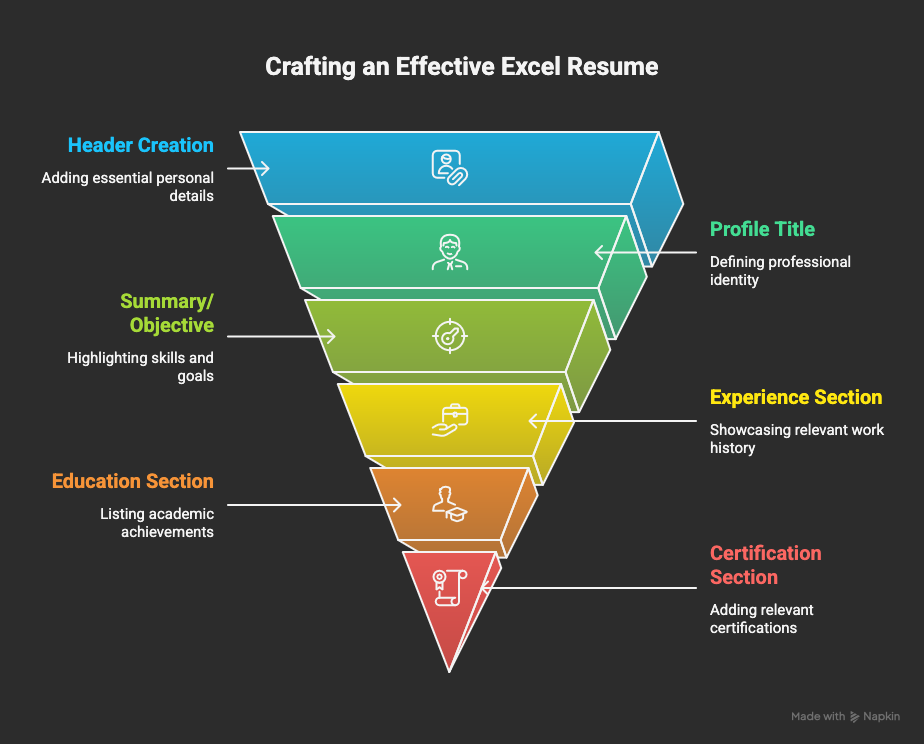
Here are the main resume sections you need to add to your resume:
- Resume Header
- Personal Information
- Contact Number
- Email ID
- Address
- Job Title: Your recent job title
- Resume Summary: A 3-4 sentence summary where you talk about your achievements
- Key Skills: A list of your core excel skills
- Professional Experience: Details of your job achievements
- Internship (fresher): Only if you are a fresher
- Education: Your relevant high school and graduation degree, along with any training/ certifications
- Additional Information / Extracurricular Activities
Here’s how you format the Excel Specialist Resume:
- Use an ATS-compliant resume template, preferably a reverse-chronological resume
- Always set your resume margin to ** 1-inch** around the page. Do not go below 1 inch. Set the line spacing between 1-1.5 points
- Always use professional resume fonts such as Calibri, Times New Roman, Arial, etc
- Keep the fonts between 11-12 points, and for the heading, use 14-16 point fonts
- Keep the resume within 1 page. Not 1.25, not .75. If you have 10+ years of experience only, then use a two-page resume.
Excel Resume Skills
The following skills are the essential requirement for an entry-level excel expert:
- SUMIF/SUMIFS
- COUNTIF / COUNTIFS
- Data Filters
- Data Sorting
- Pivot Tables
- Cell Formatting
- Data validation
- Excel shortcut keys
- Workbook
- Managing Page Layout
- Charts & its Analysis
However, these skills will not help you get far as these are entry-level resume excel skills.
If you want to get hired for a senior-level position, you must include advanced level excel skills in the resume, Such as:
- Excel Worksheets
- Advanced Charting
- Functions
- Advanced Formula
- Tool Bars
- VLOOKUP
- INDEX + MATCH
- Conditional Formatting
- PIVOT Tables & PIVOT Reporting
- VBA & Macros
- Data Tables, Simulations & solver
How to Describe Excel Skills on Resume?
Recruiters only spend 6-10 seconds reviewing a resume. That means the candidate must highlight the skills to grab the reader’s attention immediately, and recruiters can quickly identify the candidate’s skills.
The best way to do that is by creating a separate key skills section in a resume and adding the core skills there.
Excel skills resume examples:

Excel Resume Header
There are four crucial elements in the resume header, which you must include in your resume.
- Name
- Contact Number
- Location
- Email ID
- Linkedin ID (optional)
Name:
It situates at the top of your resume. It will help the recruiter identify your resumes from piles of resumes.
- Never write “Resume” or “CV” in place of your name
- Use the 16- 20 font size for the resume header.
Contact Number:
- Make sure to write your contact number without any typo or spelling mistakes, as these silly mistakes can cost you your job.
- Always write the ISD code before your contact number and use a plus (+) sign before it.
Email ID: - Do not use your current work email address
- Make sure that your email id looks professional
Location:
- Add your location in city, country code format if you are applying for a job in your country.
- Add your location in state, country code format if you apply for a job outside your country.
- Do not add your full address to your resume.
Excel Specialist Resume: Profile Title
Resume profile title is an essential part of a resume. If you want to get an in-depth understanding of the resume profile title, you can read it from Hiration’s Profile Title guide.
Here are the tips to create a profile title:
- Frame the resume profile title with the second-largest text in the resume
- Keep the resume title font size within 14-16 points
Excel Specialist Resume: Summary
Excel specialist resume summary or objective; which one should you use in your resume?
Most of the time, it depends on the candidate's experience.
A resume summary highlights your skills and accomplishments to the recruiter.
- If the candidate has less than three years of experience, use the Excel Resume objective.
- If the candidate has more than three years of experience, use the Excel experience resume summary.
- Wrap the resume summary within 3-4 lines
- Do not use first-person or second-person pronouns in the resume summary
- Start each resume summary point with "Proficient in," "Adept at," etc.
This is how your resume summary should look:
Process-oriented 5+ years experienced excel specialist highly skilled in analyzing data to bolster business growth for pharmaceutical companies. Proficient in optimizing financial operations for reduced operating costs. Adept at furnishing insights and business intelligence for assisting in data-driven decision-making.
I am an experienced excel expert skilled in crunching numbers for drug companies for increasing profit.
Excel Resume Objective
Use the resume objective if you do not have much relevant experience. The difference between resume summary and objective is unlike resume summary, Objective talks about your academic accomplishments and soft skills more than your professional skills.
This is how your resume objective should look:
Enterprising excel expert possessing experience in managing and analyzing large amounts of data for assisting with data-driven decision making. Possessing excellent leadership and communication skills.
College graduate with a passion for numbers and looking for a job in the data management field.
Excel Specialist Resume: Professional Experience
Here are the tips to follow when creating the professional experience section of your resume:
- Start the professional experience with your most recent experience and follow the reverse chronological format for writing the professional experience section.
- Read the job description and tailor your experience to fit the job description.
- Excel experts with data and numbers. Similarly, quantify your professional experience in the excel expert resume.
- Write the experiences in single line bullet points
- Make sure you highlight essential keywords and statistics in the excel expert resume to make it more scannable
- Club 2-3 related bullet points under one skill sub-heading. It improves readability
- Start the bullet points with power verbs but try to use different power verbs for other profiles.
- Use the cause & effect format when writing the excel resume bullet points.
Here’s the experience section of a Excel Specialist Resume :
Data Optimization & Database Management
- Organized rate card data into excel sheet for facilitating effective export operations
- Managed & cleaned old financial data from the database and uploaded current data into the financial systems
Data Backup & Error Management
- Performed weekly data-backup to reduce the risk of data loss
- Compared source data with system entries to detect errors for ensuring 100% accurate end results
I performed data entry for managing the export of material. Additionally, I removed old financial data and update the system with new financial data. I compiled and prioritized data and performed data backup on a weekly basis. I also reverify entered data with the source data to ensure maximum accuracy.
Excel Resume: Education Section
The minimum requirement for becoming an excel expert is having a bachelor's degree in any field. However, most of the excel experts have a Bachelor's degree in accounting or finance.
Senior profiles need you to have a Master's degree or higher.
- Here are the tips for writing the education section in your resume:
- If you are applying for an entry-level position, keep the education section at the top of the resume.
- If you are applying for an experienced profile, keep the education section after the resume.
- For an entry-level resume, focus more on the relevant coursework section in the education section.
- Include the GPA only if you have a GPA higher than 3.5
- Also, ensure you are including high school information in the education section
Here are the elements you should fill in the education section:
- Degree type
- Major
- University and location
- Honors, awards, and other academic achievements
This is how the entry-level education section should look:
Education
Master of Arts in Business Administration May '19
Stony Brook University, New York, NY
- GPA: 3.5 | Dean's list for 4 Semesters
Relevant Coursework: - Accounting, Business Management, Data Management, Financial Management, Business Accounting
Excel Expert Certification
Excel is an advanced skill that requires advanced certification.
It exponentially increases your chance of getting shortlisted for an interview.
Here are the following details which you need to include in the certification section:
- Certification name
- Name of institute
- Location of institute
- Date of enrollment and completion in month & year format
Format of Certification information in resume:
{Certification Name} | {Name of Certification body} | {Location} | {Date of enrollment & completion}
Here are some certifications that you can pursue to get an excel expert job:
- **Microsoft Excel Certifications (Microsoft)
- Excel from Beginner to Advanced (Udemy)
- Excel Skills for Business (Coursera)
- Excel Certification (LinkedIn Learning)
- Introduction to Data Analysis using Excel (Coursera)
- Excel Essentials: The Complete Excel Series (Udemy)
- Microsoft Excel Certification (GoSkills)
- Excel Certification Courses (E-LearnExcel)**
Additional Excel Expert Resume Sections to Consider:
Here are the additional information you can add in your resume:
- Awards & Honors
- Community Involvement
- Leadership & Memberships
- Workshops & Training
Cover Letter for Excel Expert Resume
Getting a job in this highly competitive space is not a piece of cake.
You need to give 110% of your resources to grab the recruiter’s attention.
We recommend you to include a cover letter along with the resume to increase your chances of getting a job.
Here are some tips for creating the excel expert resume:
- Use paragraph format to write the excel specialist cover letter
- Write the first paragraph by telling where did you find the job posting followed by your years of experience to entice the recruiter
- In the second paragraph, write about your previous experience and accomplishments
- In the third paragraph, showcase why you are the perfect candidate for the job and ask the recruiter for an interview
- Keep your word count between 300-500 words, and do not go over one page for the cover letter
Excel Resume Template
- Performing a key role in cleaning, manipulating, and transforming data to improve overall data quality
- Verifying accurate data availability for managers and decision-makers by effectively maintaining data currency
- Utilizing worksheet data and external resources to create and modify pivot tables & charts with extreme precision
- Playing a critical role in cleaning old financial data and uploading required data into new financial systems
- Generating and modifying spreadsheets comprising the company's performance data to achieve analytical goals
- Utilizing database functions, advanced filters, automatic outlining as part of compiling, sorting, and prioritizing data
- Designing and implementing standard operating procedures (SOPs) to resolve issues pertaining to data gaps
- Performing routine database backups to safeguard and secure data
- Leading and training a team of ~5 professionals on creating reports via Excel in adherence to the company's guidelines
- Prepared reports and presentations by utilizing Microsoft Word, Excel, and PowerPoint to facilitate sound decision-making
- Provided data entry support and compiled project status to render support to the top-level management
- Assisted in scheduling meetings, reviews, and conferences as per clients' and business requirements
- Oversaw email requests and reviewed data spreadsheets while ensuring 100% accuracy
- Performed a key role in maintaining a record of journal entries adhering to the company's guidelines
- Developed and evaluated reports while ensuring 100% industrial compliances to verify the accuracy of financial information
- Played a key role in reconciling balance sheet accounts on a monthly and annual basis
- Certified Excel Specialist | Microsoft Corporation | Jan '21
- Excel Foundation Course | elearn Excel | May '20
- CGPA: 3.8/4.0
- Member of Student Union | Organized meetings to delegate work to the team | Aug ' 13 - Jan '15
- Volunteer at Miracle Foundation | May '20 - Present
- Coordinating with 10+ volunteers to organize workshops for teaching excel skills to children-at-risk
- Performing a key role in raising funds for the NGO; raised USD 60k to date
- Languages: English (native) and Spanish (working proficiency)
Excel Expert Interview Questions
Here are some questions to help you with your interview preperation for excel expert job.
1) What is Microsoft Excel?
Ans. Excel is a Microsoft-developed spreadsheet application that is used for maintaining, organizing, and analyzing complex data.
2) What are cells in Microsoft Excel?
Ans. The individual boxed inside an excel spreadsheet is called cells. These cells are responsible for holding data.
3) How can cells be recognized?
Ans. Each cell have a unique address that depends on the row & column value of the cell
4) How can you add new cells in excel?
Ans. It’s an easy process.
- Right-click on any cell.
- Click on Insert
- This will open a menu where you can add a cell, a column, or a row to the sheet.
5) What are the number formats in a cell?
Ans. A cell has 11 number formats.
- General
- Number
- Currency
- Accounting
- Short Data
- Long Date
- Time
- Percentage
- Fraction
- Scientific
- Text
Key Takeaways
Here are some of the highlights from the blog:
- Divide the resume into multiple sections to increase the readability
- Use the single-line bullet points to write the professional experience section of the resume
- Create a separate section for key skills and put all the skills in that section
- Read the job description and identify the keywords and optimize the resume for those keywords.
- For an entry-level position, focus more on education, certification, projects, training, and additional experiences.
If you want a cleaner way to put all of this into practice, you can build your Excel resume on Hiration’s platform, designed to help you structure your sections, refine your bullet points, and keep your formatting fully ATS-friendly.
And if you ever get stuck, our team is available around the clock to guide you.