How should career centers write newsletters students actually open?
Career centers should write student newsletters by making the value clear within seconds. Each issue should have a defined audience, a specific action goal, a descriptive subject line, a useful preheader, a consistent cadence, and a focused content mix students can scan quickly on mobile. Strong newsletters lead with the most relevant opportunity, include a small selection of jobs or internships, add one manageable career action, promote one upcoming event, and close with one accessible support option. The goal is not to include every announcement. It is to help students quickly understand what is relevant, what needs action soon, and where to go next.
If your career center already sends a student newsletter but open rates, clicks, and event registrations remain low, the problem may be the way the newsletter is packaged.
Students need to understand within seconds why the email is relevant, what deserves their attention, and what they should do next.
A useful career newsletter does not need elaborate graphics or a long list of announcements. It needs a clear subject line, a predictable cadence, a focused content mix, and a format students can scan quickly between classes.
This guide explains how to structure each issue, write subject lines around student priorities, select an appropriate sending schedule, and decide which opportunities deserve space in the email.
What Should Career Centers Decide Before Writing the Newsletter?
Career centers should decide who the newsletter is for and what action it should prompt before collecting content. An email written for “all students” can quickly become a long list of unrelated jobs, events, articles, and reminders.
Use the following standards as a starting point:
| Newsletter element | Practical standard |
|---|---|
| Primary audience | One student group or a clearly defined general audience |
| Subject line | The most useful or time-sensitive item in the issue |
| Lead story | One opportunity that deserves immediate attention |
| Supporting content | Three to five short, distinct content blocks |
| Primary action | One prominent next step, such as register, apply, book, or prepare |
| Reading time | Easy to scan and act on within two minutes |
Before adding an item, ask whether it helps the intended student audience make a career-related decision or complete a useful action. An announcement that does not meet either standard may belong in another communication channel.
The finished newsletter should answer three questions immediately:
- Is this information relevant to me?
- Is there anything I need to act on soon?
- Where do I go to complete the next step?
How Should Career Centers Write Newsletter Subject Lines?
Career center newsletter subject lines should identify the strongest reason to open the email. Students should be able to tell whether the edition contains an application deadline, career fair, workshop, employer event, or practical resource before opening it.
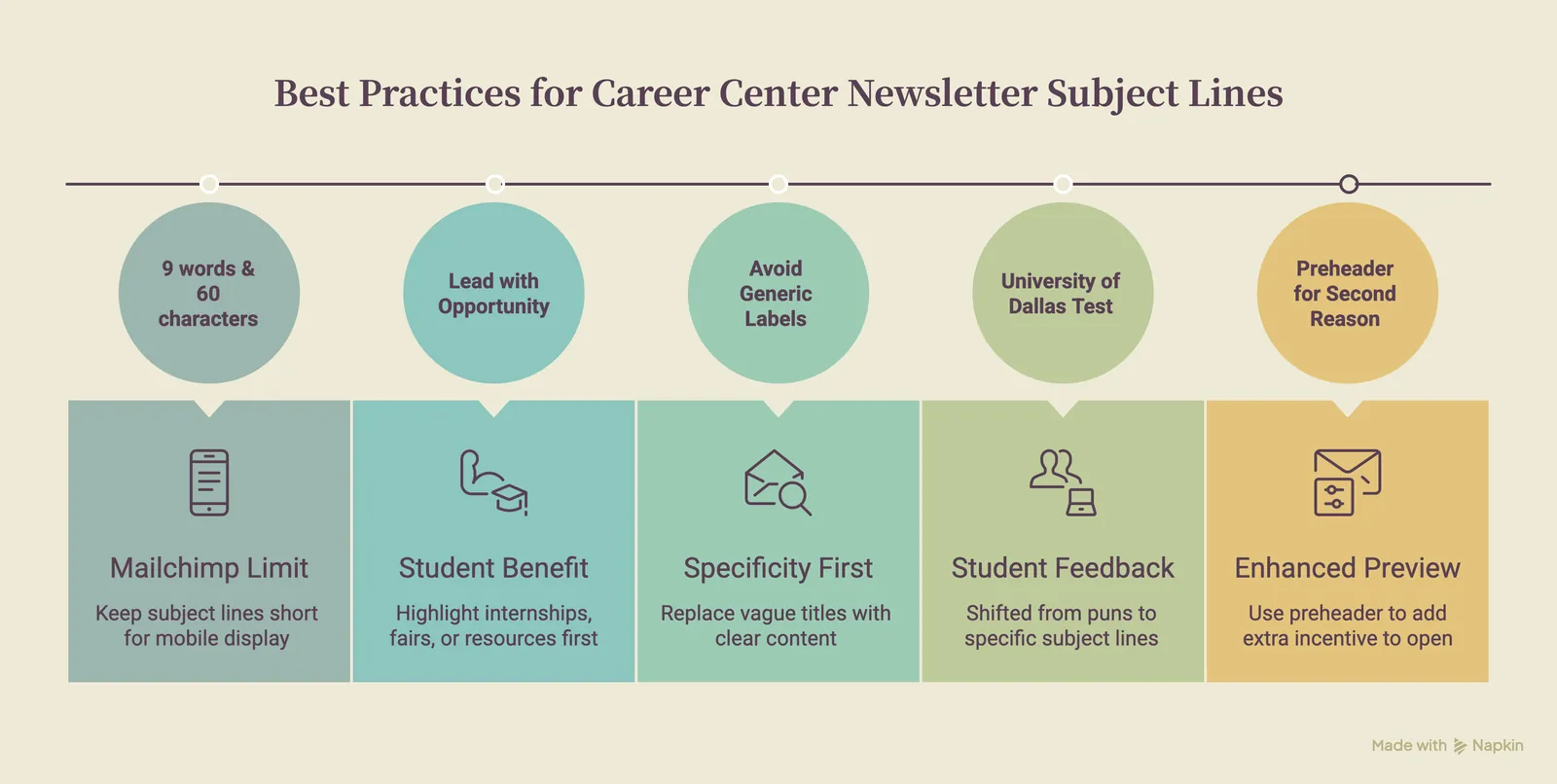
Mailchimp recommends keeping subject lines descriptive, audience-aware, and short enough to display clearly on mobile devices.
Its guidance suggests using no more than nine words and 60 characters as a practical limit, while testing different versions to learn what the specific audience responds to.
Lead With the Opportunity, Benefit, or Deadline
Useful subject lines communicate what students can gain or what they may miss.
Examples include:
- 5 internships closing this Friday
- Meet 40 employers at Thursday’s career fair
- First-years: Explore careers connected to your major
- Free professional headshots available Wednesday
- Seniors: Prepare your resume before recruiting begins
- Marketing roles hiring this week
- Three steps to prepare for next week’s interviews
The strongest subject line will usually come from the lead item rather than the newsletter’s internal name.
Avoid Generic Newsletter Labels
Labels such as these provide little information:
- Career Center Newsletter
- This Week at the Career Center
- October Career Update
- Opportunities and Resources
- Important Career Information
A recurring newsletter name can appear after the useful information:
- 6 internships closing soon | Career Center Weekly
- Prepare for the fall career fair | Career Center Update
- Graduate roles hiring now | Friday Career Brief
This preserves a recognizable series name while placing the student-facing value first.
Use Specificity Before Wordplay
The University of Dallas Office of Personal Career Development previously tested catchy and pun-based subject lines. Student feedback showed that recipients wanted to know what an email contained before opening it, so the team shifted toward clearer, more specific subject lines.
According to NACE’s profile of the University of Dallas email strategy, the office reported average open rates between 60% and 80%, with results varying by topic and student audience.
The team also tailored subject lines and greetings for groups such as first-year students, upper-level students, and graduate students.
The lesson is straightforward: students should understand the subject before they encounter the creativity.
Use the Preheader to Add a Second Reason to Open
The preheader is the short preview text that appears beside or below the subject line in many inboxes. It should add information instead of repeating the subject.
Mailchimp describes the preheader as one of the first elements recipients see when deciding whether to open an email. Its guidance recommends using the space to summarize the content, explain the benefit, or signal the next action.
For example:
Subject: 5 internships closing this Friday
Preheader: Plus resume drop-ins and two employer events next week.
Subject: First-years: Explore careers connected to your major
Preheader: Start with three activities that take less than 20 minutes.
Subject: Prepare for Thursday’s engineering fair
Preheader: Review the employer list and bring your resume for feedback.
How Often Should Career Centers Send a Student Newsletter?
The newsletter should follow a cadence the career center can maintain and students can recognize. Weekly and biweekly schedules both work within a career services context, depending on how quickly the available opportunities change and how narrowly the content is targeted.
Use a Weekly Cadence for Frequently Changing Opportunities
A weekly newsletter may be appropriate when the career center regularly has:
- New jobs and internships
- Employer information sessions
- Career fairs and workshops
- Application deadlines
- Appointment availability
- Time-sensitive preparation guidance
Send the main newsletter on a consistent day rather than selecting a new time for every edition.
The University of Dallas Office of Personal Career Development sends its main student email every Sunday night. The team selected the schedule after experimenting with different days and times, then maintained it so students would know when to expect the weekly message.
The precise day will depend on the institution. Consistency should follow testing rather than assumption.
Use a Biweekly Cadence for More Targeted Content
A biweekly newsletter may suit career centers that organize communications by industry, career interest, school, or broad major group. The additional time between editions allows the team to curate a smaller collection of relevant opportunities.
UC Santa Cruz Career Success sends industry-community newsletter updates every two weeks. Students can select communities aligned with their interests and receive targeted events, jobs, and industry guidance.
A career center could use this structure for groups such as:
- Arts, media, and communications
- Business and entrepreneurship
- Engineering and technology
- Environment and sustainability
- Government and public service
- Science and healthcare
The newsletter does not need to become more frequent simply because more content is available. The priority is a dependable flow of relevant information.
Reserve One-Off Emails for Genuine Urgency
Extra emails should be sent when waiting for the next scheduled newsletter would reduce the value of the information.
Appropriate reasons may include:
- An application deadline within the next few days
- A newly added employer event
- A location or schedule change
- Additional career fair capacity
- An opportunity available only to a specific student group
One-off messages should be narrowly targeted. Sending every general announcement separately makes it harder for students to distinguish urgent messages from routine promotion.
What Content Mix Gives Students a Reason to Open Each Edition?
Each newsletter should combine immediate opportunities with practical career support. Jobs and events provide urgency, while preparation activities make the email useful to students who are not ready to apply or attend.
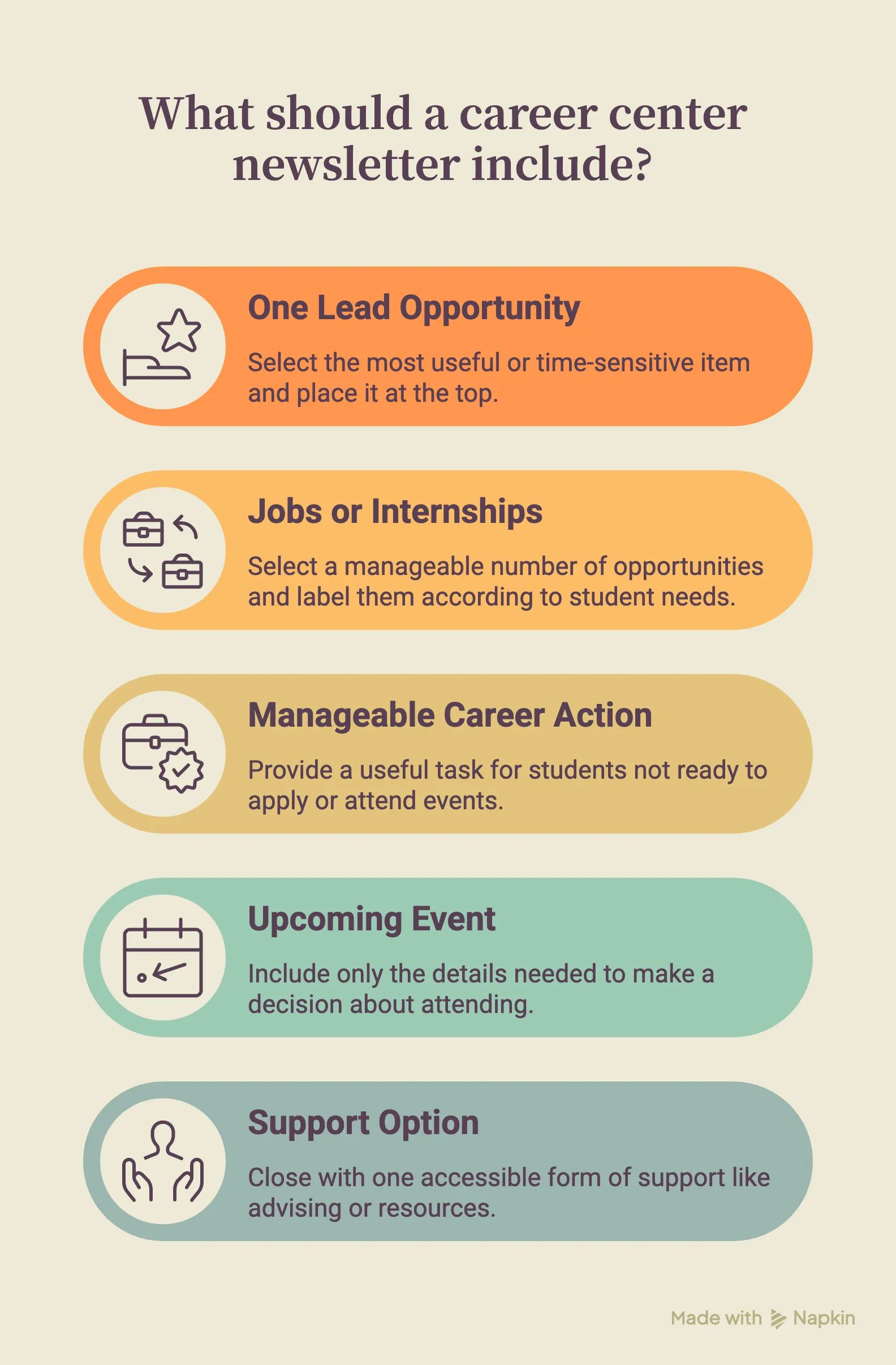
A focused edition can contain five elements:
1. One Lead Opportunity
Select the most useful or time-sensitive item and place it at the top.
A lead block should include:
- What the opportunity is
- Who it is for
- Why it may be useful
- The relevant date or deadline
- One direct action
For example:
Applications close Friday: Paid sustainability internships
Three local organizations are recruiting students from all majors for summer positions. Review the requirements and submit your application by 5 p.m. Friday.
View the internships
The description gives students enough information to decide whether to click without requiring a long introduction.
2. A Small Selection of Jobs or Internships
Avoid reproducing the entire job board in the newsletter. Select a manageable number of opportunities and label them according to the information students need.
Useful labels may include:
- Open to all majors
- No previous experience required
- Paid summer internship
- On-campus position
- Suitable for first-year students
- Application closes this week
An archived UMBC Career Center newsletter for STEM majors led with new internships and jobs for science students, then directed readers to appointments, programs, and related career resources.
The edition presented a sample of relevant roles rather than treating the email as a substitute for the full opportunity database.
3. One Manageable Career Action
Students who are not ready to apply for a position or attend an event should still find something useful to complete.
Examples include:
- Add one quantified result to your resume
- Save three employers attending the career fair
- Complete a short career interest assessment
- Practise one common interview question
- Update your LinkedIn headline
- Book a resume review
- Identify one alumnus to contact
Link the action directly to the relevant resource, appointment page, or career platform. Avoid making students search the career center website after clicking.
4. One Upcoming Event
Include only the details needed to make a decision:
- Event title
- Date and time
- Intended audience
- Purpose
- Registration link
For example:
Healthcare Employer Panel
Tuesday, October 14, 4 p.m.
Hear from recruiters in public health, clinical research, and healthcare administration. Open to students from all majors.
Register for the panel
5. One Support Option
Close the content mix with one accessible form of support, such as:
- Drop-in advising hours
- Appointment availability
- Resume or interview preparation
- Career exploration resources
- A job-search guide
- A career technology tool
The support option should connect naturally to the other content. An edition promoting a career fair might end with resume feedback or employer-research guidance.
How Should a Career Center Newsletter Be Formatted?
A career center newsletter should be easy to scan on a phone. Use short content blocks, descriptive headings, visible deadlines, meaningful links, and a clear order of importance.
Mailchimp recommends concise newsletter copy, a clear call to action, and an inverted-pyramid structure that places the strongest message first.
A practical format includes the following elements.
Use a Recognizable Sender Name
Students should immediately recognize the sender.
Clear options include:
- State University Career Center
- College of Business Career Services
- Jordan from the Career Center
Avoid unexplained office abbreviations, staff initials, and system-generated names.
Open With a One-Sentence Summary
The first sentence should tell students what the edition contains.
For example:
This week’s update includes five paid internships closing soon, preparation for the spring career fair, and new resume drop-in times.
Long greetings, office updates, and general introductions delay the information students opened the email to find.
Place One Prominent Item First
The first content block should receive the strongest headline, clearest explanation, and most visible call to action.
Secondary items can follow in shorter blocks. Use a consistent pattern for each:
Descriptive heading
One or two sentences explaining the opportunity and relevant deadline.
Specific action link
Use Meaningful Link Text
Link text should tell the student what will happen after clicking.
Use:
- View the internship requirements
- Register for the career fair
- Book a resume review
- Explore interview practice
- See participating employers
Avoid:
- Click here
- Learn more
- Read more
- Go
Mailchimp’s email accessibility guidance recommends meaningful link text, logical headings, responsive structure, alt text, and keeping essential information out of images.
Keep the Mobile Layout Simple
Use a single-column layout whenever possible. Multiple columns may stack unpredictably on smaller screens and can disrupt the intended reading order.
Keep paragraphs short, use buttons large enough to tap, and check that dates and deadlines remain visible without zooming. Test the newsletter on several screen sizes before sending it to the full list.
End With a Functional Footer
The footer should include:
- Career center name
- Contact information
- Office location
- Accessibility information where applicable
- Subscription preferences
- Required email-management links
Avoid using the footer as another section for announcements.
Should Career Centers Send the Same Newsletter to Every Student?
Career centers should segment newsletters when the usefulness of the content changes substantially between student groups. Start with a few stable categories, then use a student persona messaging playbook to adjust the subject line, lead item, tone, and call to action for each group.
Useful segments may include:
- Class year
- Undergraduate and graduate students
- Academic school or broad major group
- Career interest or industry
- International students
- Students searching for internships
- Students approaching graduation
Yale College allows students to customize its weekly Office of Career Strategy newsletter according to their interests. The selected preferences determine the job postings, internship opportunities, events, blogs, and resources students receive.
The University of Denver describes a preference structure with two levels: the type of content, such as jobs, events, blogs, and resources, and the area of interest, such as an academic category or industry.
A smaller career center can apply the same principle without building a complex preference system:
- Send one general newsletter and change the lead block by class year, including a distinct approach to engaging first-year students in career planning.
- Create separate editions during major recruiting periods.
- Send industry-focused newsletters every two weeks.
- Target event reminders to registered or interested students.
- Adjust the subject line for each student segment.
- Feature graduate opportunities only in the graduate edition.
Even limited segmentation can remove content that has no practical relevance for the recipient.
How Can Career Centers Evaluate Newsletter Performance?
Career centers should evaluate whether students complete the intended actions after receiving the newsletter. Open rates help assess subject lines and sender recognition, while clicks, registrations, attendance, and appointments show whether the content prompted meaningful engagement.
Track measures such as:
- Open rate
- Click rate
- Clicks on the lead item
- Event registrations
- Event attendance
- Appointment requests
- Job and internship link clicks
- Resource or career platform usage
- Replies from students
- Unsubscribes
- Results by student segment
The University of Dallas career team reviews click rates, event RSVPs, attendance, appointment requests, and direct emails alongside its open rates. Staff reported seeing increases in advising requests and event registrations after some messages were sent.
Review several editions before changing the entire newsletter. Test one major variable at a time.
For example:
- Compare a specific subject line with a general one.
- Test two sending times while keeping the content unchanged.
- Move the primary action higher in the email.
- Compare general and segmented versions.
- Reduce the number of content blocks.
- Replace vague link text with specific actions.
Career centers should also ask students directly which sections they use, which information feels repetitive, and what makes an email worth opening. A small student review group can identify problems that email-platform metrics do not explain.
Wrapping Up
A strong newsletter should do more than promote opportunities. It should guide students toward a clear next step, whether that means exploring career options, improving a resume, preparing for an interview, or strengthening a LinkedIn profile.
Hiration gives career centers a full-stack career readiness suite that supports those actions across the student journey. Students can access Career Assessments and AI-powered modules for Resume Optimization, Interview Simulation, LinkedIn optimization, and other career preparation activities.
Career teams can use the separate Counselor Module to manage cohorts, workflows, student progress, and analytics within a secure, FERPA and SOC 2-compliant platform.
This gives each newsletter a clearer destination and helps career teams connect student outreach with measurable career readiness activity.
Career Center Newsletters — FAQs
How should career centers write newsletters students actually open?
Career centers should write newsletters that quickly show relevance, urgency, and the next action. Each issue should use a clear subject line, a focused lead item, short content blocks, meaningful links, mobile-friendly formatting, and a predictable cadence students can recognize.
What should career centers decide before writing a newsletter?
Career centers should decide who the newsletter is for, what student action it should prompt, which content deserves space, and what the reader should understand within the first few seconds. This prevents the email from becoming a long list of unrelated announcements.
What should a student career newsletter answer immediately?
A student career newsletter should answer three questions immediately: whether the information is relevant to the student, whether anything needs action soon, and where the student should go to complete the next step.
How should career centers write newsletter subject lines?
Career center newsletter subject lines should identify the strongest reason to open the email, such as an application deadline, career fair, employer event, workshop, resource, or student benefit. The subject line should be specific, descriptive, and short enough to display clearly on mobile.
What are good career center newsletter subject line examples?
Strong examples include “5 internships closing this Friday,” “Meet 40 employers at Thursday’s career fair,” “First-years: Explore careers connected to your major,” “Free professional headshots available Wednesday,” and “Prepare for the fall career fair.”
What subject lines should career centers avoid?
Career centers should avoid vague labels such as “Career Center Newsletter,” “This Week at the Career Center,” “October Career Update,” “Opportunities and Resources,” or “Important Career Information” because they do not tell students what the email contains.
How should career centers use newsletter preheaders?
The preheader should add a second reason to open the email instead of repeating the subject line. It can summarize the issue, mention another useful item, explain the benefit, or point to the next action students can take.
How often should career centers send a student newsletter?
Career centers should use a cadence they can maintain and students can recognize. Weekly newsletters work well when jobs, internships, events, and deadlines change frequently. Biweekly newsletters may work better for targeted industry, school, major, or student-interest editions.
When should career centers send one-off student emails?
One-off emails should be reserved for genuine urgency, such as an application deadline within a few days, a newly added employer event, a location or schedule change, additional career fair capacity, or an opportunity available only to a specific student group.
What content mix works best in a career center newsletter?
A focused newsletter can include one lead opportunity, a small selection of jobs or internships, one manageable career action, one upcoming event, and one support option such as advising, resume review, interview preparation, career exploration, or a career platform.
How many jobs or internships should a newsletter include?
A newsletter should include a small, curated selection rather than reproduce the entire job board. Opportunities should be labeled clearly with useful details such as “open to all majors,” “paid summer internship,” “no previous experience required,” or “application closes this week.”
What career actions can newsletters ask students to complete?
Useful newsletter actions include adding one quantified result to a resume, saving three employers attending a career fair, completing a career interest assessment, practicing one interview question, updating a LinkedIn headline, booking a resume review, or identifying one alumnus to contact.
How should a career center newsletter be formatted?
A career center newsletter should be easy to scan on a phone. Use a recognizable sender name, a one-sentence opening summary, one prominent lead item, short secondary blocks, clear deadlines, meaningful link text, a simple single-column layout, and a functional footer.
What link text should career centers use in newsletters?
Link text should describe the action students will take after clicking. Use phrases such as “View the internship requirements,” “Register for the career fair,” “Book a resume review,” “Explore interview practice,” or “See participating employers” instead of vague text like “click here” or “learn more.”
Should career centers send the same newsletter to every student?
Career centers should segment newsletters when the usefulness of the content changes by class year, academic school, major group, career interest, student status, or job-search stage. Even limited segmentation can remove irrelevant content and make each issue more useful to the recipient.
What student segments work well for career newsletters?
Useful segments include first-year students, upper-level students, graduate students, academic schools, broad major groups, industry interests, international students, students searching for internships, and students approaching graduation.
How can career centers evaluate newsletter performance?
Career centers should evaluate whether students complete the intended actions after receiving the newsletter. Useful metrics include open rate, click rate, clicks on the lead item, event registrations, event attendance, appointment requests, job and internship link clicks, replies, unsubscribes, and results by student segment.
Why are open rates not enough to measure newsletter success?
Open rates help assess subject lines and sender recognition, but they do not show whether the email produced meaningful engagement. Career centers should also track clicks, registrations, attendance, appointments, resource usage, replies, and whether students completed the intended next step.
How can career centers improve student newsletter performance over time?
Career centers should test one major variable at a time, such as subject line specificity, sending time, lead item placement, segmentation, number of content blocks, or link text. They should also ask students directly which sections they use and what makes an email worth opening.
How can Hiration support student newsletter engagement?
Hiration can give each newsletter a clearer destination by supporting student actions across career assessments, resume optimization, interview simulation, LinkedIn optimization, and other career preparation activities. Career teams can use the Counselor Module to manage cohorts, workflows, student progress, and analytics within a FERPA and SOC 2-compliant platform.