How can advising teams build a career exploration resource hub that drives action instead of information overload?
Advising teams can improve student outcomes by organizing resources around exploration stages rather than storing content in large link libraries. Effective hubs guide students through discovery, validation, experience-building, and preparation while creating clear advisor handoffs, structured next steps, equitable access pathways, and measurable progression from resource use to advising engagement and career action.
If your “career resources” page is a long list of links, students aren't using a hub. They're scanning a shelf.
Most career centers already know consolidation matters.
The challenge is that consolidation without guidance creates friction, not momentum.
A resource page is often a student’s first digital touchpoint with career services.
If it feels passive, career centers miss a chance to guide exploration, improve advising conversations, and connect early curiosity to action.
A strong hub works less like a storage room and more like a guided pathway. It shows students what to do first, what to do next, and when to move from self-service to advisor support.
Why Do Resource Hubs Need Pathways, Not Just Links?
Students don't need more career content. They need a sequence.
A strong hub reduces choice overload by showing what to do first, what to ignore for now, and when to move from exploration into action.

What link farms get wrong
A link farm looks efficient to staff. It feels extensive. It often includes every worksheet, every external site, every employer-facing tool, and every PDF the office has produced.
Students experience it differently:
- Too many entry points means they can't tell where to begin.
- Mixed readiness levels put first-year explorers next to seniors preparing for final-round interviews.
- No handoff logic leaves self-service disconnected from advising.
- Static curation means old resources stay visible long after they stop being useful.
The result is familiar. Students click around, save a few pages, and leave without taking a real next step.
Practical rule: If a student can land on a page and still ask “What should I do first?” the page isn't finished.
What pathways do better
A pathway model organizes resources around student intent.
That usually means a sequence such as discover, validate, experience, and prepare. Each stage has a clear question, a limited set of approved resources, and a visible action that moves the student forward.
That structure also helps staff.
Advisors can coach from the same framework. Employer relations teams can map programs to the “experience” stage. Career educators can build workshops to reinforce specific decision points rather than broad awareness.
A good test is whether your hub supports the advising model you want.
If your team is trying to move from generic drop-ins to more developmental coaching, the hub needs to do more of the baseline orientation work.
That's where a practical career exploration advisor framework becomes useful. It gives staff a common way to move students from curiosity to evidence-based decisions.
What Resources Do Students Need at Each Exploration Stage?
Students need different resources as they move from awareness to validation and then to preparation.
The mistake is giving everyone the same tools at the same time. Strong hubs stage content by mindset, not just by topic.
A stage-based content map
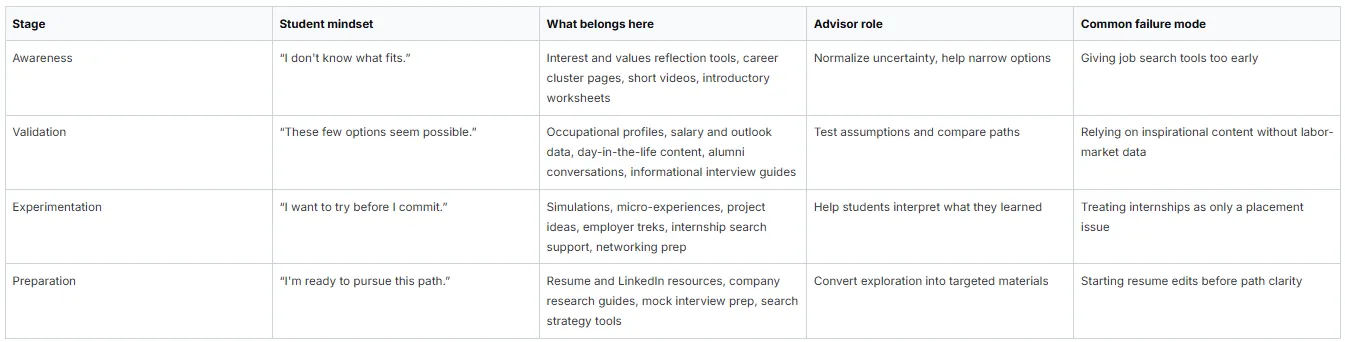
What the University of Michigan example shows
Michigan's engineering model is useful because it doesn't collapse exploration and job search into the same bucket. It separates learning about a path from marketing yourself for that path.
That distinction matters operationally.
If a student hasn't done enough validation work, resume review can turn into speculation.
Advisors end up rewriting bullets for roles the student may not even want. A better hub creates prerequisites. For example:
- Before resume review complete an occupation comparison worksheet
- Before mock interview prep identify a target role family
- Before internship search coaching review industry-specific search channels
Build for progression, not completeness
Many teams ask, “What resources should we include?” The better question is, “What decision is this resource helping the student make?”
If the answer isn't clear, the resource probably doesn't belong on a core pathway page.
The same logic applies to career exploration. A resource should not only explain an option; it should move the student toward comparison, validation, advising, or action.
A hub becomes useful when each stage answers one decision clearly and points to one next step visibly.
How Should You Organize the Hub's Information Architecture?
Use a hybrid architecture. Build broad entry points around student tasks, then layer filters for major, identity, interest area, and readiness level.
Organizing only by major or only by class year is too rigid for real student behavior.

Compare the main architecture options

A practical homepage usually starts with task-based doors such as:
- Explore careers
- Research roles and industries
- Gain experience
- Prepare applications
- Meet with an advisor
Then add filters inside those pages:
- by major
- by career interest
- by student identity or affinity group
- by readiness level
Use named examples, but adapt the logic
Wake Forest University's career work is often cited for organizing student support around career communities and employer-facing pathways.
What other institutions can adapt isn't the exact naming. It's the idea that navigation should reflect how students make choices, not how offices divide responsibilities.
University of Michigan offers another lesson. Their staged progression works because each page implies a next action. That's what many institutional sites still miss.
Build taxonomy before you build pages
Most hubs get messy because the team starts publishing before agreeing on metadata. Decide this first:
- Content type such as worksheet, video, tool, article, labor-market source
- Student stage such as discover, validate, experiment, prepare
- Audience tags such as first-year, graduate student, international student, engineering, business
- Action type such as reflect, compare, schedule, apply
This governance work is less exciting than choosing a platform, but it determines whether the hub stays usable.
If your team is reevaluating systems, a technology framed guide can help you decide what belongs in the hub, what should stay embedded elsewhere, and what needs API or SSO support rather than another standalone page.
How Can You Guide Students from Self-Service to Advisor Support?
The handoff works when every major resource includes a clear advisor trigger. Self-service should answer foundational questions.
Advisor time should focus on interpretation, decision-making, and accountability.

A hub without service tiers usually creates one of two problems.
Either students stay in self-service too long and stall, or they book appointments for questions the website should have handled. Neither is a staffing win.
Add handoff language directly on the page
Use copy that tells students when to stop browsing and get help. Good examples:
- After this worksheet book a 20-minute exploration appointment to compare your top two options.
- If three roles still look equally strong bring your notes to drop-ins and an advisor can help sort by fit and constraints
- Once you've chosen a target path move to resume review and upload your draft before the appointment.
- If you're unsure how this applies to your major meet with your assigned coach or career community advisor.
A tiered support model pays off. The hub handles orientation. Staff handle judgment. Our guide on tiered student support can help formalize who handles what and when.
Give advisors prompts, not just pages
Students should arrive with evidence. Advisors should have language ready to continue the conversation, not restart it.
Advisor follow-up prompts
- Exploration prompt “What did you rule out after reviewing those occupation profiles?”
- Reality-testing prompt “What did you learn from labor-market data that changed your assumptions?”
- Decision prompt “Which option still fits after considering training, work environment, and timeline?”
- Action prompt “What's the smallest next step you can complete this week?”
Don't ask students whether they reviewed the resource. Ask what decision the resource helped them make.
Keep the build simple enough to maintain
Many teams overestimate how complex the first version needs to be. If your web team is limited, a lightweight site can still work if the pathways, CTAs, and tagging rules are clear.
For teams building quickly with limited development support, this a career center tech stack guide is useful background on options and constraints.
How Do You Ensure the Hub Is Equitable and Inclusive?
Design the hub around access barriers, not just broad engagement.
Students need pathways that reflect time constraints, labor-market realities, identity-specific concerns, and varying levels of familiarity with professional norms.
What inclusion looks like in practice
An equitable hub usually includes dedicated navigation for student populations who often face hidden friction:
- First-generation students need plain-language explanations of recruiting norms, networking expectations, and how to evaluate pathways.
- Commuter and working students need asynchronous resources, shorter action steps, and realistic timelines.
- Students with disabilities and neurodivergent learners benefit from predictable page structures, low-clutter design, and concrete examples.
International students need clear routing between exploration resources and immigration-related employment guidance.
The useful takeaway is not to create separate, isolated microsites for every group. It's to tag and surface relevant resources without forcing students to decode institutional structure.
Make equity a governance rule
In practice, equity breaks down when teams treat it as a content add-on. Make it part of your review process instead.
Use a standing checklist:

Accessibility standards and FERPA considerations also belong here.
If a page relies on inaccessible PDFs, unclear media captions, or tools that collect student data without clear review, the hub may look modern while excluding the very students it should support.
Which KPIs Signal That the Hub Is Actually Working?
The best KPI is a next-step conversion, not a page view.
Measure whether students move from resource use into a concrete action such as a worksheet submission, appointment, occupational shortlist, networking step, or internship search activity.
According to NACE, graduating seniors who used at least one career service averaged 1.24 job offers, compared with 1.0 for non-users. Paid internship students averaged 1.61 offers, compared with 0.95 for unpaid internships and 0.77 for no internship.
That makes one thing clear: career centers should measure whether students move from resource use into services, internships, and next-step action, not just whether they visit a page.

A practical dashboard structure

What to stop overvaluing
Page views matter for troubleshooting. They don't prove learning, decision quality, or movement.
If your most visited page doesn't produce a visible next step, it may be your least effective page.
Centers that want a tighter reporting model should connect hub activity to advising and outcomes dashboards.
A practical starting point is defining one KPI for each stage and assigning an owner to review it monthly. A career center metrics guide is useful for translating those indicators into reporting language that resonates with leadership.
Wrapping Up
A strong career exploration resource hub does more than organize links. It gives students a guided path from curiosity to evidence, from evidence to advising, and from advising to action.
For career centers, the real work is architectural: define the stages, build the handoffs, govern the content, and measure whether students are taking the next step. Technology should support that structure, not substitute for it.
Hiration can support this model with a full-stack career readiness suite that spans Career Assessments, AI-powered Resume Optimization, Interview Simulation, LinkedIn optimization, cover letter support, and a dedicated Counselor Module for managing cohorts, workflows, and analytics within a secure, FERPA and SOC 2-compliant platform.
A resource hub becomes valuable when every page helps students make a clearer decision and gives advisors better evidence to continue the conversation.
Career Exploration Resource Hubs — FAQs
Why do many career resource hubs fail to engage students?
Many hubs function as link libraries rather than guided pathways, leaving students unsure where to start, what matters most, and what action to take next.
What is the difference between a resource hub and a link repository?
A resource hub guides decision-making through structured pathways, while a repository simply stores content without helping students move from exploration to action.
How should career exploration resources be organized?
Resources should be grouped by exploration stage, such as discover, validate, experience, and prepare, with each stage supporting a specific student decision.
Why is progression more important than completeness?
Students benefit more from a clear next step than from access to every available resource. Too many options often create decision paralysis.
What information architecture works best for career hubs?
A hybrid structure works well, combining task-based entry points with filters for major, identity, interest area, and readiness level.
How should hubs connect self-service resources to advising?
Every major resource should include a clear advisor trigger, helping students recognize when interpretation, decision-making, or accountability support is needed.
What role do advisors play after students use resources?
Advisors should focus on interpreting evidence, testing assumptions, evaluating options, and helping students make decisions rather than repeating basic information.
How can career centers make resource hubs more equitable?
Hubs should account for first-generation students, working learners, commuters, international students, and students with disabilities through accessible design and relevant pathway support.
What metrics indicate that a resource hub is working?
Strong indicators include worksheet completion, appointment scheduling, occupation shortlists, networking actions, internship engagement, and progression to the next exploration stage.
What is the biggest strategic shift advising teams should make?
Advising teams should move from measuring resource consumption to measuring whether resources help students make decisions, take action, and engage more deeply with career services.