How can advising teams use career exploration worksheets to improve student decision-making?
Advising teams can improve career exploration outcomes by using worksheets as decision-support tools rather than reflection exercises. Effective worksheets help students compare options, evaluate evidence, identify constraints, rank priorities, and document next steps. When used consistently across advising, workshops, and courses, they create stronger continuity, clearer student direction, and more measurable progress.
Are your career exploration worksheets helping students make better choices, or just creating paperwork for the next appointment?
That is the gap many career centers run into.
Worksheets are easy to assign and collect. They are harder to use well unless they connect reflection to occupational evidence, advisor follow-through, and one clear next step.
Used poorly, they become static handouts.
Used well, they create a repeatable decision-making process across advising appointments, workshops, and courses.
This guide shows how advising teams can choose, design, and deploy career exploration worksheets in a way that supports student decisions, staff continuity, and measurable progress.
What should career centers evaluate before choosing a worksheet tool?

The best worksheet is not always the most polished one.
It is the one that fits your staffing model, student volume, advising workflow, and follow-up capacity.
The related guide on career center capacity planning offers a useful lens for matching worksheet design to service volume, advisor workload, and follow-up capacity.
A paper worksheet may work better for first-year seminars, walk-in traffic, or high-volume workshops. A digital tool may work better when advisors need stored responses, pattern tracking, or integration into course shells.
Before choosing a worksheet, evaluate it against five practical questions:
- Where will students complete it? Orientation, class, workshop, advising intake, and asynchronous modules place very different demands on format, timing, and instructions.
- What kind of thinking does it produce? Some worksheets only collect preferences. Better tools help students compare options, name constraints, and connect interests to evidence.
- How much advisor interpretation is required? If every completed worksheet still needs ten minutes of decoding, the tool may be too ambiguous for scale.
- Can it support option evaluation, not just self-reflection? Students often need help translating experiences into work themes and identifying transferable skills for career growth, then weighing those insights against actual roles.
- Can the worksheet be reused across channels? The strongest tools survive beyond one appointment and can be adapted for workshops, embedded in classes, and used by peer educators without rewriting the whole activity.
A simple test helps.
Review ten completed worksheets and ask: can an advisor identify the student’s top options, why those options matter, and what should happen next?
If not, the worksheet is collecting activity, not improving decisions.
Why should worksheets support thinking before, during, and after advising?
A worksheet should not only prepare students for an appointment.
It should support the full advising cycle.
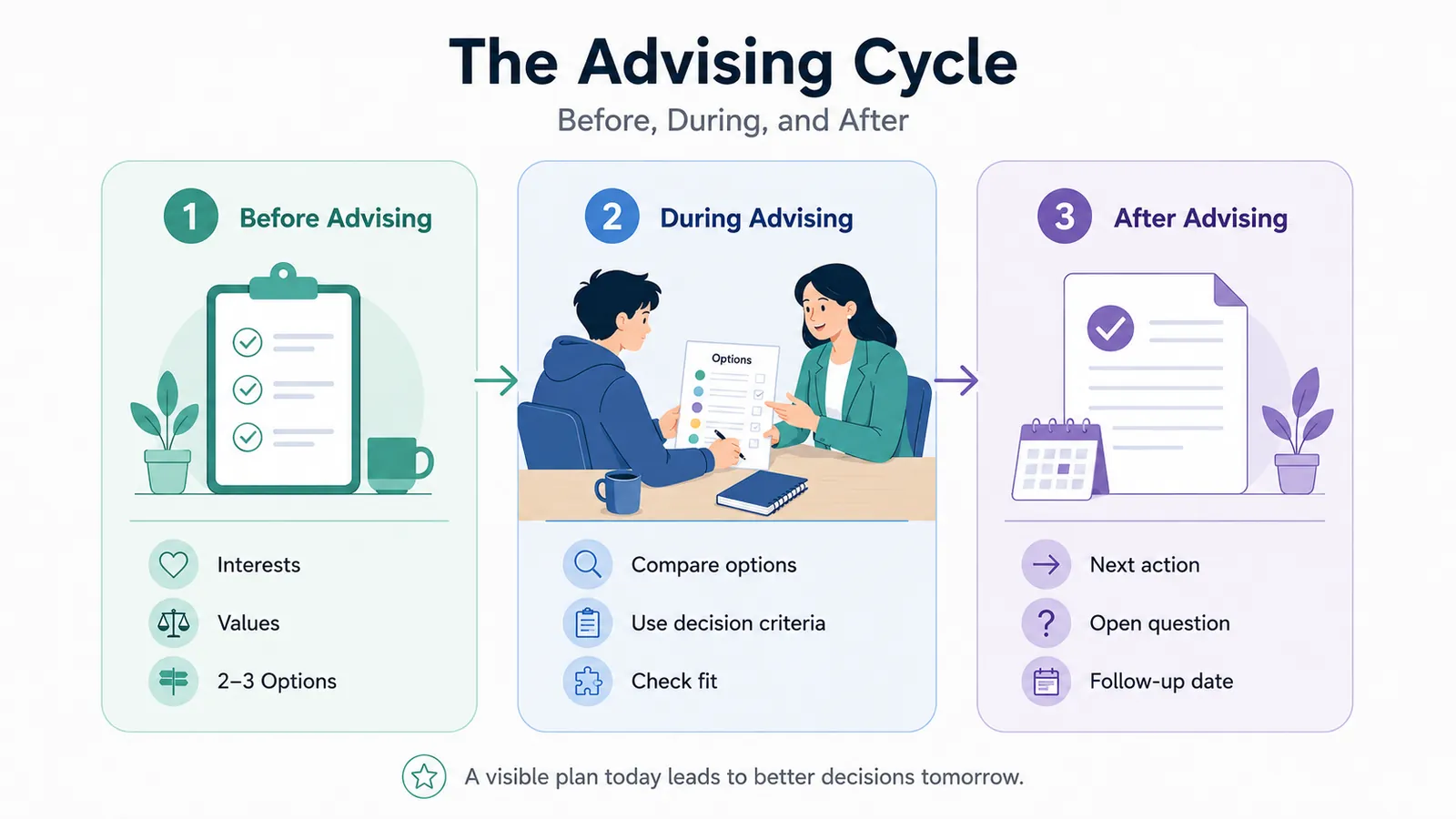
Before the appointment, it should collect interests, values, constraints, and early options.
During the appointment, it should help the advisor compare those options using decision criteria such as work setting, training time, schedule fit, salary expectations, and skill alignment.
After the appointment, it should record one next action, one open question, and one follow-up deadline.
That structure matters because students often leave a strong conversation with no written record of what changed.
A better worksheet keeps the thinking visible.
A practical sequence looks like this:
- Before advising: collect interests, values, constraints, and two or three options the student already considers realistic.
- During advising: compare those options using criteria that matter in actual decisions, such as training time, work setting, schedule fit, and transferability from prior experiences.
- After advising: record one immediate action, one open question, and one deadline for follow-up.
This makes the worksheet useful beyond one meeting.
It can carry into a workshop, a peer advising session, a course assignment, or a second appointment without forcing the student to start over.
Which worksheet sections help students organize career options?
What helps a student sort through four plausible paths without turning the worksheet into another reflection exercise they never use again?
The answer is structure that supports comparison. A strong worksheet does more than ask students what they enjoy.
It helps them narrow options, document reasons, and identify what evidence is still missing.
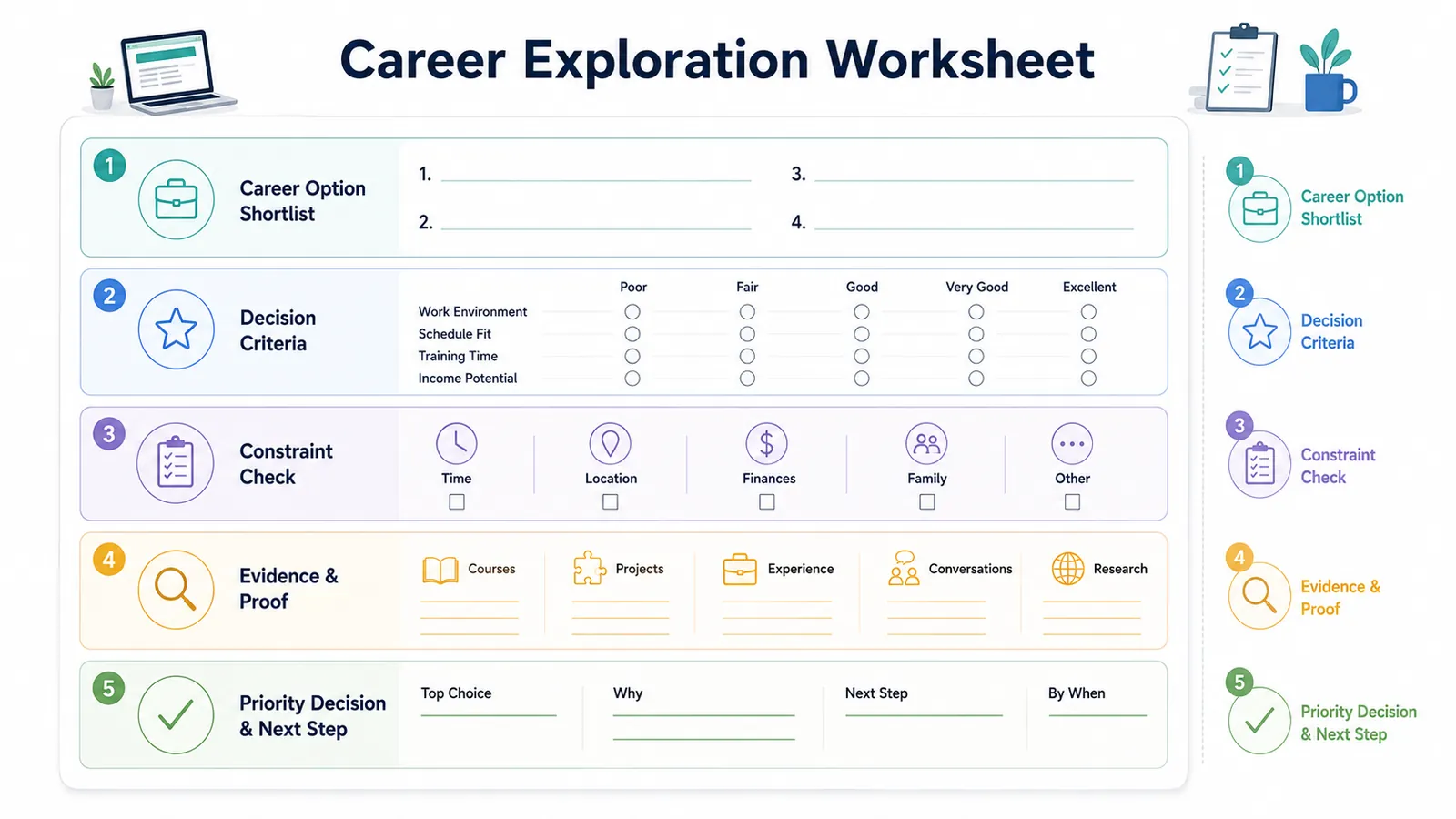
Five sections usually carry that work.
- Career option shortlist: Require two to four options, not an open-ended brainstorm.
- Decision criteria: Include the factors the student will use to choose, such as work environment, pace, level of interaction, advancement path, and alignment with career readiness competencies in higher education when the center wants stronger language around transferable strengths.
- Constraint check: Add factors that often drive choice but get omitted from generic exploration forms.
- Evidence and proof: Ask what supports each option so far. Coursework, projects, internships, campus roles, informational interviews, and labor market research all count.
- Priority decision: End with a ranked order, a short rationale, and one question that still needs to be answered before commitment.
A worksheet is working when an advisor can scan it in under two minutes and understand why Option A is ahead of Options B and C.
A good worksheet also leaves room for uncertainty. Students do not need to declare a permanent choice.
That is how worksheets start contributing to better appointments, cleaner referrals, and stronger follow-through across the center.
How should career centers compare the main worksheet tools?
No single worksheet platform covers every student population or advising use case.
Most career centers need a mix: one broad self-assessment tool, one skills or values tool, one major-to-pathway resource, and one audience-specific option for graduate or discipline-based cohorts.
Here is a practical comparison.
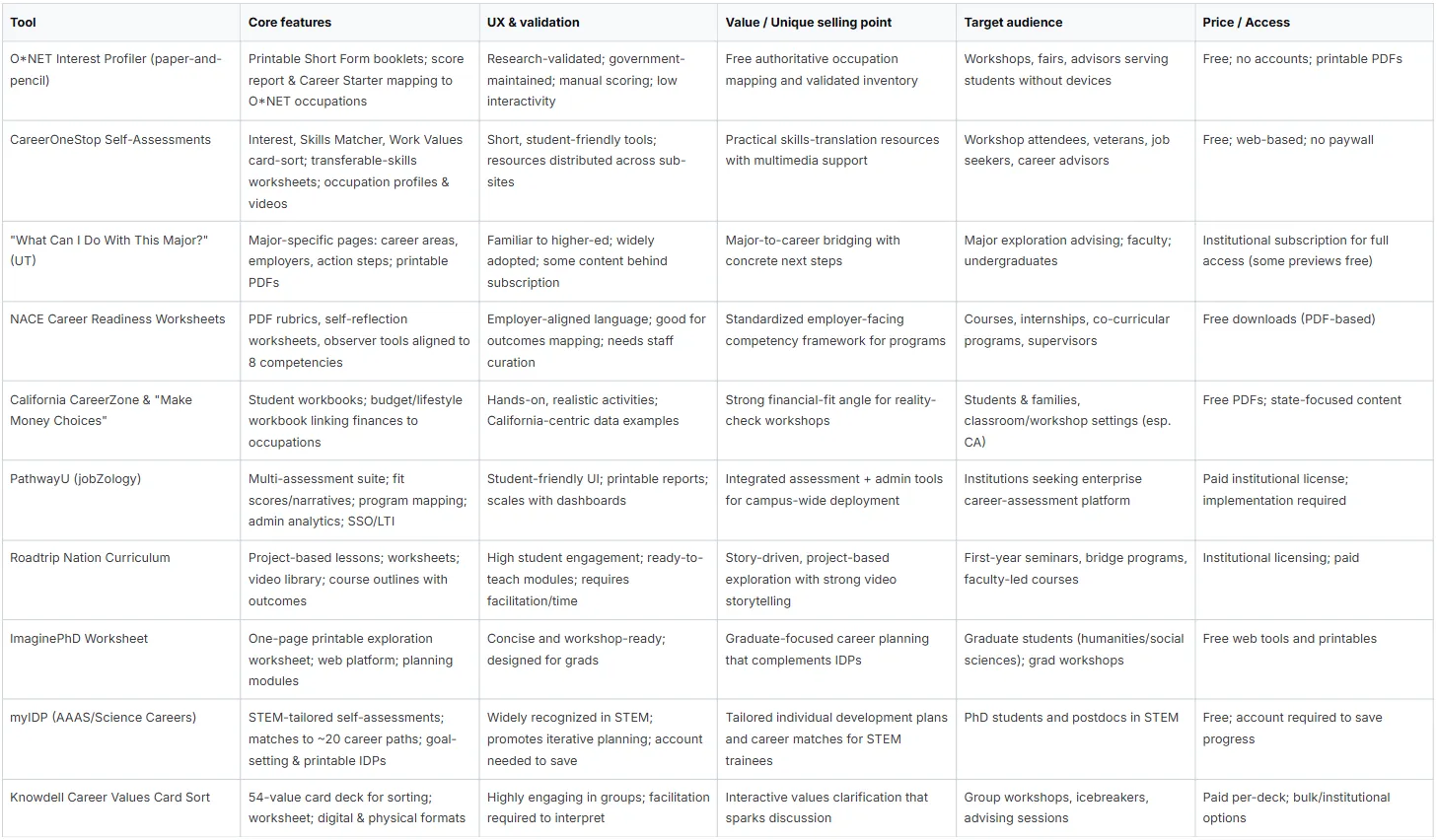
The choice should depend on workflow, not preference.
A no-login printable tool may be ideal for orientation. A platform may be better for institutions trying to track cohort progress. A values card sort may work well in groups but need advisor interpretation afterward.
The goal is not to pick the “best” worksheet.
The goal is to match the tool to the advising problem.
How Should Teams Use This Comparison?
The table should not be treated as a ranking.
It should help teams match the worksheet tool to the advising problem.
For high-volume settings, tools like O*NET Interest Profiler and CareerOneStop work well because they are accessible, quick to deploy, and easy to use in workshops or first-year seminars.
For pathway translation, tools like What Can I Do With This Major? and NACE competency worksheets are stronger because they connect majors, skills, employer language, and readiness outcomes.
For specialized populations, tools like ImaginePhD, myIDP, and values card sorts work better when students need discipline-specific planning, graduate-level exploration, or deeper values clarification.
For scale, platforms like PathwayU may make sense when the center needs stored results, advisor visibility, and cohort-level continuity. The trade-off is rollout, training, licensing, and staff adoption.
The decision rule is simple: choose the tool based on the student’s next advising need, not the tool’s popularity.
How should prompts be designed for interests, skills, values, proof, and next steps?
Good prompts should help advisors use the student’s answers in a real appointment.
If a worksheet produces vague reflection, staff still have to rebuild the conversation from scratch.
If it produces ranked priorities, examples, constraints, and one next move, it becomes part of the advising system.
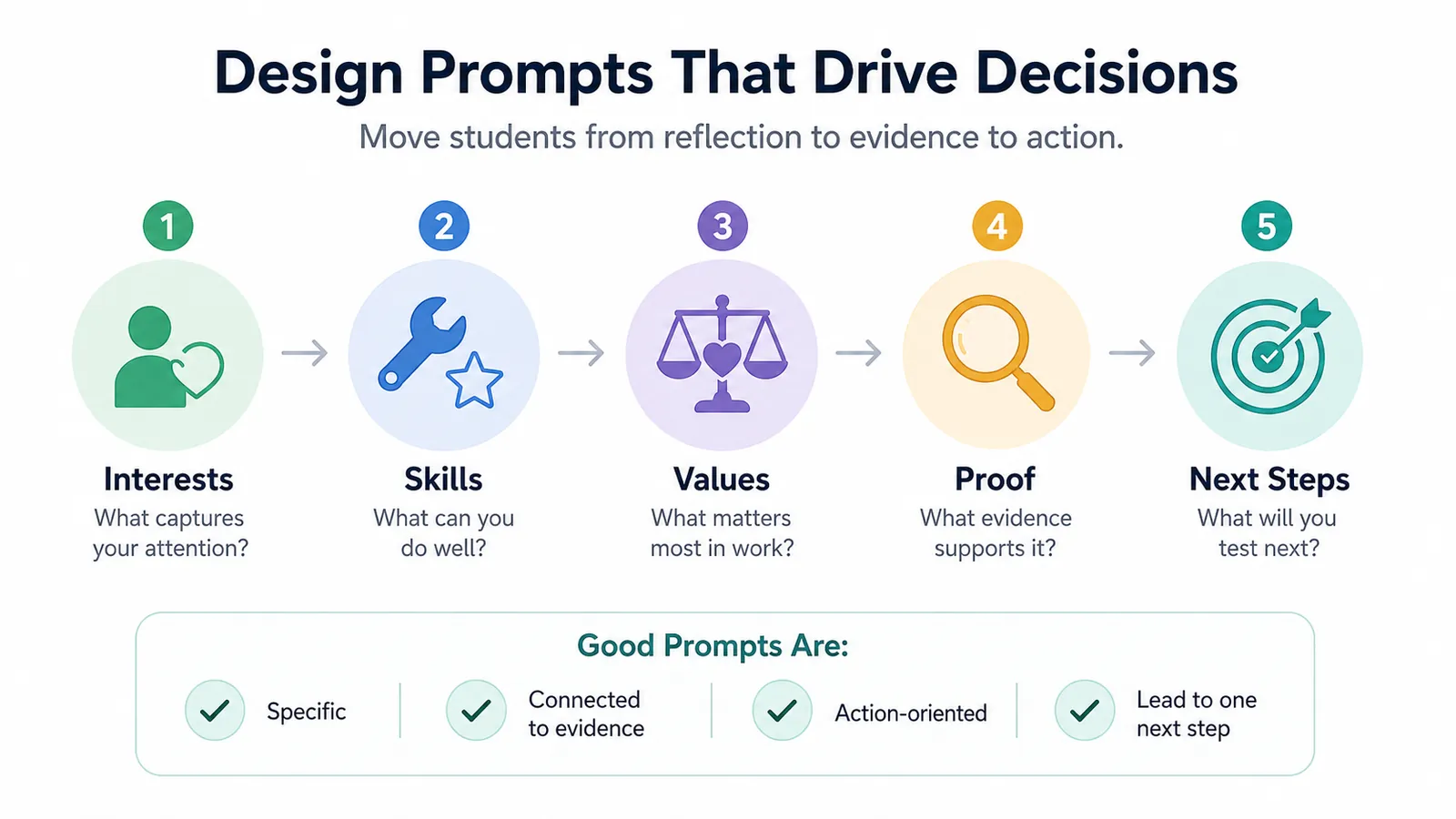
The strongest prompt sets cover five areas in sequence and make students show their reasoning:
- Interests: Which topics, problems, settings, or tasks hold your attention long enough that you would choose them again?
- Skills: What can you do competently now, and where have you shown it in class, work, research, service, or campus leadership?
- Values: Which work conditions matter most to you, which matter somewhat, and which are optional?
- Proof: What specific example supports each skill, interest, or value claim?
- Next steps: What is the next experiment, conversation, or comparison you will complete by a specific date?
The sequence matters.
Students often answer interests with preferences, skills with confidence, and values with abstract ideals. Better prompts push them from claim to evidence to decision.
A few design rules hold up across drop-ins, scheduled appointments, and classroom use:
- Ask for examples, not labels. “Describe one time you solved a problem for others” produces better advising data than “Rate your problem-solving.”
- Require ranking. Long value lists feel reflective but rarely help students choose between options.
- Build in constraints. Cost, location, schedule, caregiving, transportation, work authorization, and desired earnings change what is realistic.
- Separate confidence from proof. Students may feel unsure about a skill they have demonstrated repeatedly, or confident about one they have not tested much.
- Use dated next steps. “I will compare two roles and bring one question about each by next Thursday” is easier to review than “research careers.”
How can worksheets be used across appointments, workshops, and course assignments?
How do you keep a worksheet from changing shape every time a student moves from a one-on-one appointment to a classroom assignment or a workshop?
Use one decision-making structure across all three settings, then adjust the level of facilitation, evidence required, and follow-up.
If advisors use one worksheet, instructors assign another, and workshop staff hand out a third, students repeat reflection without building toward a choice.
A shared worksheet architecture creates cleaner handoffs.
The underlying sequence should stay stable: identify interests and values, compare a small set of options, check those options against real constraints and occupational evidence, then record a dated action.
The setting changes how much support students get at each step.
- Appointments: Assign selected prompts before the meeting, then use appointment time for interpretation, trade-offs, and decision quality. Advisors should focus less on collecting answers and more on helping students rank options, question assumptions, and choose next actions.
- Workshops: Use the worksheet live with brief writing intervals, pair or small-group discussion, and a structured debrief. This format works best when the goal is early-stage exploration or option generation, not highly individualized planning.
- Course assignments: Require a fuller version with reflection, occupation research, and revision after feedback. Faculty can grade for analysis and use of evidence, while the career center supplies the common framework and prompt design.
A simple rule works well:
Use 20 percent completion before advising, 60 percent during workshops, and near-full completion in course assignments.
That keeps the structure consistent without overloading every setting.
Our guide on career readiness curriculum mapping can help teams connect worksheets to staged milestones, classroom touchpoints, and measurable outcomes.
Practice note: Do not let each unit build its own worksheet from scratch. Create a shared template with required sections, then allow limited local customization for discipline examples, course outcomes, or population-specific prompts.
How can career centers avoid worksheets becoming passive paperwork?
Tie completion to discussion, interpretation, and a visible decision point.
Passive paperwork happens when students submit worksheets that nobody revisits or when forms collect reflection without requiring comparison, labor-market verification, or follow-up action.
One operational safeguard is simple. Never mark a worksheet “complete” based only on submission.
Completion should require one of the following: an advisor conversation, a workshop debrief, a faculty-reviewed reflection, or a documented next-step plan.
Common failure modes
- Too many open-ended prompts: Students write generic answers that don't narrow anything.
- No labor-market check: Reflection stays detached from occupation realities.
- No ownership: Advisors, faculty, and coaches each assume someone else will discuss the worksheet.
- No second use: The worksheet never comes back in the next meeting.
Passive paperwork usually appears when worksheets have too many open-ended prompts, no labor-market check, no owner, and no second use.
A worksheet should come back into the conversation.
If it disappears after submission, it becomes paperwork. If it is revisited, revised, and connected to action, it becomes evidence.
Which signs show students are using worksheets to make better decisions?
Completion rates are useful for workflow tracking, but they do not show whether students are choosing better.
Decision quality shows up in the reasoning.
A worksheet is working when students can:
Rank options and explain the order.
Use criteria such as training time, work environment, schedule, pay expectations, and mobility.
Bring evidence from coursework, projects, jobs, student roles, or employer conversations.
Revise assumptions after research or professional conversations.
Choose next-step tests that match their uncertainty.
Useful signs include:
- Students rank options and explain the order
- Students use criteria such as training length, work environment, pay expectations, mobility, or schedule
- Students bring proof, such as coursework, projects, jobs, campus roles, or feedback from others
- Students correct earlier assumptions after researching occupations or talking with professionals
- Students choose next-step tests that match their uncertainty, such as a class, shadowing conversation, student organization, internship search, or graduate program review
Advisors should spend less time pulling basic information out of the student and more time pressure-testing options, identifying gaps, and deciding what evidence is still missing.
Our guide on career center dashboards can help teams track this kind of movement beyond appointment volume and worksheet completion.
Scaling exploration from individual worksheets to institutional readiness
The strongest career exploration worksheets are not standalone documents.
They are operating tools inside a broader readiness system.
They help students reflect, but their real value is creating consistency across advising, workshops, and courses while keeping exploration tied to occupational evidence and next-step planning.
A worksheet should not end with “possible careers.”
It should end with ranked options, decision criteria, evidence, constraints, and a short action plan. It should also reappear later.
When worksheets show up before, during, and after advising, they stop being forms and start becoming records of student decision-making.
The institutional payoff is practical.
Staff can coach more consistently. Faculty can assign exploration work without inventing their own formats. Student success teams can use a shared language for major and career direction. Employer relations teams can connect exploration with skill development and opportunity awareness.
Leadership can see whether the center is supporting movement, not just engagement.
Wrapping Up
A good worksheet does not need to be flashy.
It needs to make the next appointment sharper, the next decision easier, and the student’s path clearer.
As programs scale, scattered forms, disconnected spreadsheets, and one-off advising notes make it harder for teams to see student progress across assessments, reflections, resume readiness, interview preparation, and cohort outcomes.
A stronger system connects those signals in one place.
Hiration supports that broader career readiness workflow with Career Assessments, AI-powered Resume Optimization, Interview Simulation, and more, along with a separate Counselor Module to manage cohorts, workflows, and analytics in a secure, FERPA and SOC 2-compliant platform.
For career centers, the value is not just automation.
It is giving advisors a clearer view of student movement so they can spend more time on judgment, coaching, and decision support.
That is the standard worth holding: worksheets that create less paperwork and better decisions.
Career Exploration Worksheets for Advising Teams — FAQs
What is the purpose of a career exploration worksheet?
A strong worksheet helps students compare career options, organize evidence, evaluate constraints, and identify next steps rather than simply reflect on interests.
How should advising teams evaluate worksheet tools?
Teams should assess where students will complete the worksheet, what type of thinking it produces, how much interpretation advisors must provide, and whether it supports decision-making.
Why should worksheets support the full advising cycle?
Effective worksheets collect information before advising, guide option evaluation during appointments, and document actions and follow-up after the conversation.
What sections should every exploration worksheet include?
Most effective worksheets include career options, decision criteria, constraints, supporting evidence, and a prioritized action plan.
Why is option comparison more useful than open-ended reflection?
Comparison helps students weigh realistic alternatives, evaluate trade-offs, and narrow choices using evidence rather than preferences alone.
What makes a strong worksheet prompt?
Strong prompts require examples, rankings, evidence, constraints, and specific next actions instead of broad self-assessments or generic reflection.
Can the same worksheet be used across advising, workshops, and courses?
Yes. The underlying decision-making structure should remain consistent while facilitation level, evidence requirements, and follow-up expectations vary by setting.
How can teams prevent worksheets from becoming passive paperwork?
Worksheets should be revisited during appointments, workshops, or assignments and connected to discussion, interpretation, labor-market evidence, and action planning.
How can advisors tell whether a worksheet is improving decisions?
Students should be able to rank options, explain their reasoning, use evidence, revise assumptions, and identify meaningful next-step experiments.
What is the biggest shift advising teams should make?
Advising teams should move from tracking worksheet completion toward evaluating decision quality, option clarity, follow-through, and student progress over time.