What should a First Destination Survey dashboard include?
A First Destination Survey dashboard should show where graduates go after completing their degree, how complete the institution’s data is, and how reliable the reported outcomes are. The strongest dashboards include NACE-aligned metrics such as total graduates, knowledge rate, career outcome rate, outcome categories, employment details, continuing education details, salary data where appropriate, top employers, graduate schools, geographic destinations, filters, methodology notes, and privacy rules. The goal is not to show every possible chart, but to help students, leaders, deans, employers, and career teams understand graduate outcomes clearly while protecting sensitive data.
If your career center has First Destination Survey data but the dashboard still feels hard to explain, hard to trust, or hard for different stakeholders to use, the issue may not be the data itself.
It may be the way the data is organized and presented.
Leaders want a clear graduate outcomes story. Deans want program-level insight. Employer relations teams want hiring patterns. Career staff need to see where follow-up is still required. A single employment percentage cannot serve all of those needs.
This guide shows how to build a First Destination Survey dashboard that is clear, NACE-aligned, privacy-conscious, and useful for both public reporting and internal action. You’ll see dashboard examples, essential sections, metrics, filters, methodology notes, and reporting rules career centers can adapt.
What Does First Destination Mean in Higher Education?
First destination refers to a graduate’s employment, continuing education, service, military, or other reported status after completing their degree. A First Destination Survey (FDS) collects this information, including graduates still seeking an outcome or not seeking one.
Career centers use the data to build dashboards that track graduate outcomes, knowledge rates, and institutional performance.
What should a First Destination Survey dashboard show?
A First Destination Survey dashboard should show where graduates go after completing their degree, how complete the institution’s data is, and what the outcomes mean for different stakeholders.
At minimum, the dashboard should show:
- Total graduates in the reporting cohort
- Knowledge rate
- Career outcome rate
- Outcome breakdown by NACE category
- Employment details
- Continuing education details
- Salary data where sample size allows
- Top employers
- Top graduate schools
- Geographic destinations
- Program, college, major, and degree-level filters
- Reporting window
- Data sources
- Methodology notes
- Privacy and suppression rules
The dashboard should not start with too many filters, charts, or narrative explanations. The first screen should answer one simple question:
What happened to this graduating class, and how reliable is the data?
| Dashboard view | Main audience | What it should answer | Example elements |
|---|---|---|---|
| Public outcomes view | Prospective students, families, employers | Where do graduates go after college? | Career outcome rate, knowledge rate, top employers, graduate schools, salary ranges |
| Academic program view | Deans, department chairs, faculty | What outcomes are students in this program achieving? | Outcomes by major, industry, employer, location, continuing education |
| Internal follow-up view | Career center staff | Which graduates still need support? | Seeking employment, seeking continuing education, unknown outcomes, outreach status |
| Employer pipeline view | Employer relations team | Which employers, industries, and regions are hiring graduates? | Top employers, industry clusters, geography, hiring volume |
| Methodology view | Institutional research, leadership, public users | Can the data be trusted? | Definitions, formulas, reporting window, data sources, suppression rules |
If the goal is to track student readiness before graduation, use a separate readiness dashboard for resumes, interviews, milestones, and advisor interventions.
What are strong First Destination Survey dashboard examples career centers can learn from?
Strong FDS dashboard examples usually do three things well: they make the headline outcome easy to understand, allow users to explore by academic or career pathway, and explain the methodology clearly enough that the data feels trustworthy.
Here are useful examples career centers can study before building or updating their own dashboard.
| Example | What it shows well | What career centers can adapt |
|---|---|---|
| UCLA First Destination Survey Dashboard | UCLA frames the dashboard around undergraduate career outcomes and notes that FDS data can inform career expectations for undergraduates, new alumni, and prospective students. | Use plain-language framing before the visualization so users understand what the dashboard represents. |
| Carnegie Mellon First Destination Career Outcomes | CMU separates dashboard data from definitions, including class years, reporting timelines, data sources, and knowledge-rate explanations. | Keep methodology close to the dashboard, especially if the visualization itself is dense. |
| University of Oklahoma Outcomes Dashboard | OU states that its survey is based on NACE guidelines and presents post-graduation outcomes through a public dashboard. | Put NACE alignment near the dashboard so users understand the reporting standard behind the numbers. |
| UC Riverside Career Outcomes | UCR explains that its First-Destination Survey captures graduates’ first career steps within six months of graduation. | Use student-centered language without weakening the institutional reporting purpose. |
| Oakland University Post-Graduation Outcomes Dashboard | Oakland states that its survey content, timeline, and procedures align with NACE guidelines, and that results are not displayed when there are fewer than ten records. | Add a visible small-sample rule so users understand why some data may be hidden. |
What should the FDS dashboard template include?
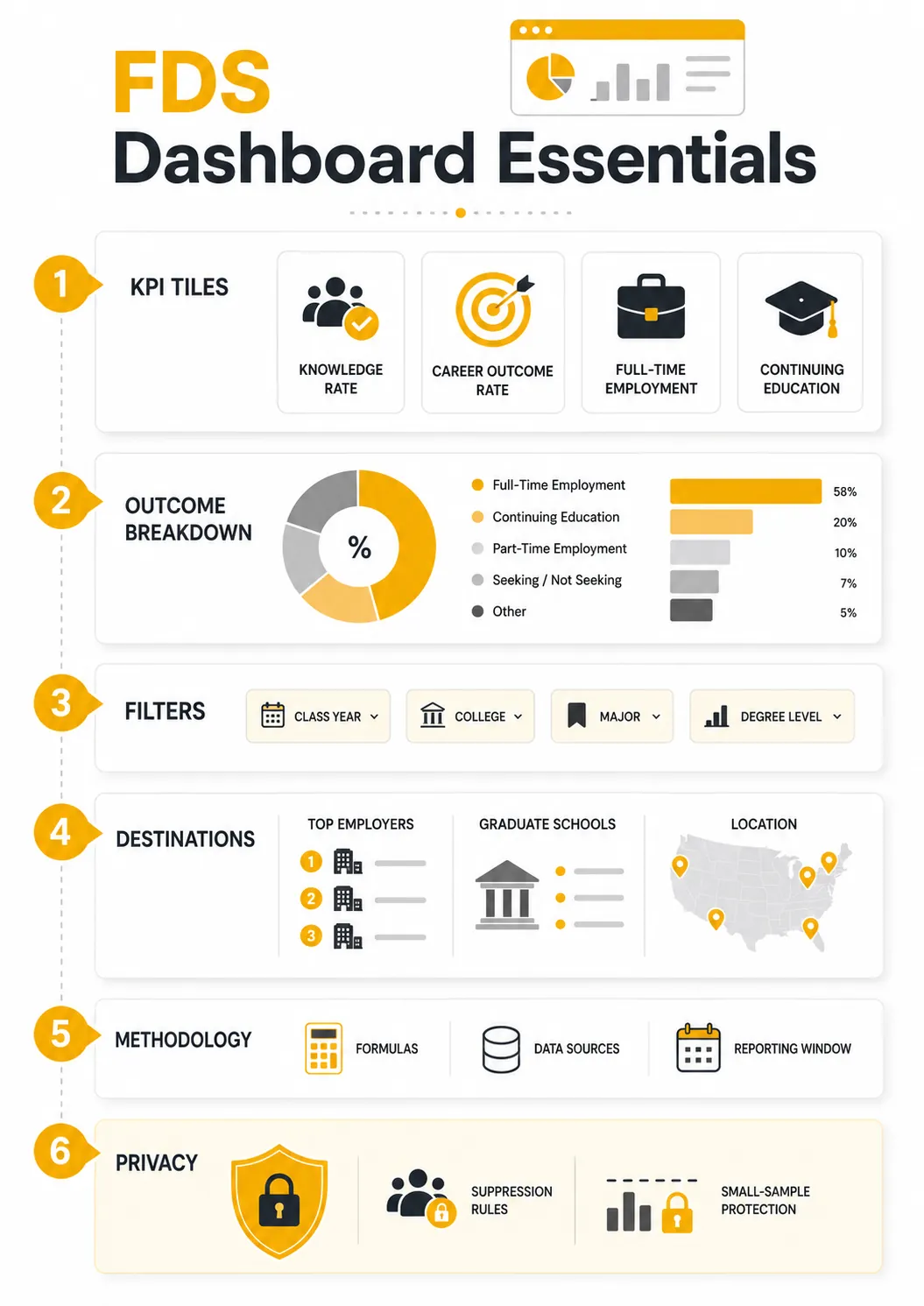
A practical FDS dashboard template should move from summary to detail. Start with the class-level outcome, then let users explore by college, program, destination, employer, salary, and methodology.
Use this structure as the core layout.
| Dashboard section | What to include | Why it matters |
|---|---|---|
| Header | Class year, reporting window, total graduates, data collection end date | Establishes the scope of the dashboard |
| KPI tiles | Career outcome rate, knowledge rate, full-time employment rate, continuing education rate, median salary where appropriate | Gives users the headline story quickly |
| Outcome breakdown | Employed full time, employed part time, continuing education, service, military, seeking employment, seeking continuing education, not seeking | Prevents one headline rate from hiding important categories |
| Academic filters | College, department, major, degree level, class year | Helps academic leaders explore program-level outcomes |
| Employment details | Employer, industry, function, job title, location, salary range | Shows where graduates are working and which employers appear repeatedly |
| Continuing education details | Graduate school, program type, field of study, location | Shows where graduates continue their education |
| Geographic view | City, state, region, country, or remote indicator | Helps explain local, regional, national, and global graduate mobility |
| Internal follow-up view | Still seeking, unknown outcomes, outreach status, advisor notes where appropriate | Helps staff act on unresolved outcomes |
| Methodology footer | Definitions, formulas, data sources, collection period, suppression rules | Protects the dashboard from misinterpretation |
Which NACE-aligned metrics should appear at the top?
The top of the dashboard should include a small set of consistent, NACE-aligned metrics before adding custom views. The most important metrics are:
- Total graduates
- Knowledge rate
- Career outcome rate
- Outcome breakdown
- Full-time employment rate
- Continuing education rate
- Still-seeking rate
- Median salary, where sample size allows
NACE defines knowledge rate as the percentage of the graduating class for whom an outcome destination is known. This includes graduates who are employed, in service, in the military, continuing education, still seeking an outcome, or not seeking an outcome.
NACE also recommends reporting career outcomes rate together with knowledge rate, because an outcomes percentage is only meaningful when users know how much of the graduating class is represented.
That pairing should sit near the top of every FDS dashboard.
A 92% career outcome rate with a 35% knowledge rate tells a very different story from a 92% career outcome rate with an 80% knowledge rate. The first may raise questions about coverage. The second gives the result more credibility.
To calculate the knowledge and career outcome rate, use the sample dashboard above. For instance:
- Knowledge rate: 800 graduates with known outcomes ÷ 1,000 total graduates = 80%.
- Career outcome rate: 650 graduates employed, continuing education, in service, or in the military ÷ 770 eligible graduates with known outcomes = 84.4%.
Under NACE's reporting method, the 30 graduates classified as not seeking count toward knowledge rate but are excluded from the career outcome rate denominator. The 200 graduates with unknown outcomes are excluded from both the career outcome numerator and denominator.
This distinction should appear in the dashboard's methodology, especially when academic departments compare outcome rates across programs.
If the main issue is a low knowledge rate, the dashboard redesign should be paired with a stronger FDS response-rate strategy.
What formula notes should the dashboard include?
Every FDS dashboard should include a methodology note or expandable formula section to make the numbers defensible.
| Metric | Plain-language meaning | Formula or reporting note |
|---|---|---|
| Knowledge rate | How much of the graduating class the institution has outcome information for | Graduates with known outcomes ÷ total graduates in the reporting cohort |
| Career outcome rate | How many graduates with known outcomes are employed, continuing education, serving, or in the military | Report this beside knowledge rate; avoid using “placement rate” |
| Outcome breakdown | How graduates are distributed across outcome categories | Show employment, continuing education, service, military, seeking, not seeking, and unknown outcomes separately |
| Still-seeking rate | How many graduates are still seeking employment or continuing education | Use this internally for follow-up planning |
| Median salary | Middle reported salary among graduates who reported salary data | Show only when sample size and reporting rules allow |
NACE’s First-Destination standards describe outcomes such as employment, additional education, service, military, still seeking employment or education, and starting salary for graduates employed full time.
They also recommend explaining how the data was collected so users have transparency into the reporting process. The methodology note should also state:
- Class year
- Reporting window
- Collection end date
- Data sources used
- Whether salary is self-reported
- Whether outcomes are based on survey responses, verified sources, or both
- Whether the dashboard includes undergraduate students, graduate students, or both
- Any small-cell suppression rules
- Contact person or office for questions
A dashboard without methodology can still look polished, but it becomes easier to misread.
Before publishing, ask Institutional Research to reproduce the headline rates directly from the underlying cohort records.
Check that each graduate appears in only one primary outcome category, unknown outcomes are excluded from the knowledge-rate numerator, and not-seeking graduates are handled correctly in the career-outcome calculation.
Repeat the checks for at least one program-level filter. This helps identify discrepancies between the dashboard's headline numbers and filtered results before stakeholders begin using them.
How should public, internal, and leadership FDS views differ?
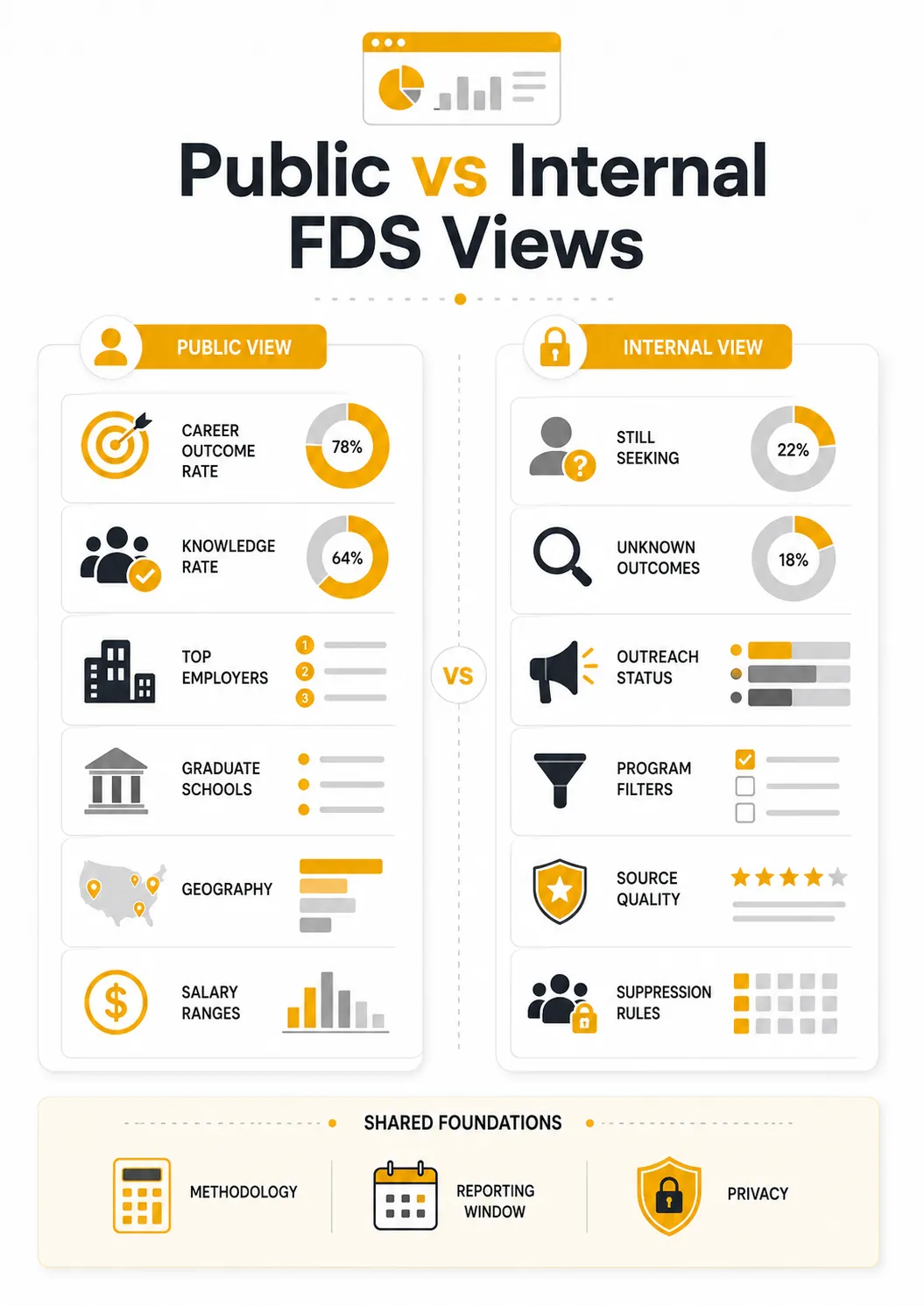
Not every FDS dashboard view should be public. Public dashboards should communicate outcomes clearly and responsibly. Internal dashboards can support action, but they still need access controls and clear rules for sensitive data.
A public user may want to know where graduates work. A dean may want to compare outcomes by program. A career center staff member may need to know which graduates are still seeking employment. Those are not the same use case.
| View | Audience | Include | Avoid |
|---|---|---|---|
| Public dashboard | Students, families, employers, alumni, admissions | Career outcome rate, knowledge rate, employers, graduate schools, salary ranges, geography, methodology | Student-level records, small-N salary data, excessive filters |
| Leadership dashboard | President, provost, deans, institutional research | Outcomes by college, program, degree level, class year, trend line, methodology | Overly granular student details |
| Career center internal view | Career services staff | Still-seeking graduates, unknown outcomes, outreach status, source of outcome data | Public sharing without role-based access |
| Employer relations view | Employer relations team | Top employers, industries, functions, locations, hiring volume | Individual salary or demographic details unless approved |
| Academic department view | Faculty, chairs, program leaders | Outcomes by major, continuing education, employer clusters, location | Comparisons that ignore knowledge rate or sample size |
For internal users, the dashboard can include a follow-up view with graduates still seeking employment, graduates still seeking continuing education, graduates with unknown outcomes, last outreach date, assigned staff member, follow-up status, and next step.
This view should not be public. Its purpose is action, not promotion.
What filters should an FDS dashboard include?
FDS dashboard filters should help users answer reporting questions without slicing the data so narrowly that privacy or reliability suffers.
Useful filters include:
- Class year
- College or school
- Department
- Major
- Degree level
- Employment status
- Continuing education status
- Industry
- Employer
- Job function
- Location
- Salary range
- Student group, only where approved for internal reporting
- Internship participation, where collected
- Data source, where useful internally
Public dashboards should use fewer filters. Internal dashboards can include more detail, but only when access controls and suppression rules are in place.
The dashboard should not offer every possible filter just because the data exists. Too many filters can make the dashboard harder to use and easier to misinterpret.
What data fields belong in the FDS dashboard data dictionary?
A data dictionary helps the dashboard stay consistent from year to year. It also helps new staff, institutional research partners, and leadership users understand what each field means.
At minimum, define these fields:
- Class year
- Total graduates
- Outcome category
- Knowledge source
- Employer name
- Job title
- Industry
- Job function
- Salary
- Location
- Continuing education institution
- Reporting status
- Suppression status
The employer-name field deserves particular attention. Without standardization, the same employer may appear several ways across the dashboard. For example, “Amazon,” “Amazon.com,” and “AWS” could appear as separate employers unless the team creates a naming rule.
The same issue can happen with job functions, industries, graduate schools, and locations. A clean dashboard depends on clean definitions before the data reaches the visualization layer.
What visualizations work best for graduate outcomes data?
The best FDS visualizations are the ones that answer common stakeholder questions quickly.
A bar chart is not automatically weak. A map is not automatically useful. The right visualization depends on the question.
Use KPI tiles for headline numbers. Use stacked bars or simple distribution charts for outcome categories. Use ranked tables for top employers and graduate schools. Use maps only when geography is meaningful. Use salary bands or ranges when exact salary reporting could create privacy risk.
How should career centers handle privacy and small sample sizes?
FDS dashboards often contain sensitive or identifiable information, especially when showing salary, major-level outcomes, demographic breakdowns, or small programs.
Career centers should work with Institutional Research, legal, and compliance teams before publishing or sharing dashboards. The privacy rules should be decided before the dashboard goes live, not after someone notices a risky filter.
The U.S. Department of Education’s disclosure avoidance guidance notes that simple suppression of small subgroups may not be enough to protect student privacy because suppressed numbers can sometimes be recalculated from visible totals.
For FDS dashboards, that means career centers should:
- Suppress or combine small-N groups where individuals could be identified
- Avoid publishing salary data for very small majors or cohorts
- Use ranges instead of exact values when appropriate
- Separate public dashboards from internal dashboards
- Avoid student-level data in public views
- Add notes explaining when data is suppressed
- Review demographic and salary views carefully
- Limit internal access based on role and purpose
- Consider complementary suppression when one hidden cell could be recalculated from visible totals
Avoid hard-coding a universal rule like “N < 5” unless that is your institution’s approved policy.
A safer public note is:
Data is suppressed or combined where small cell sizes could create privacy risk.
That wording gives the institution room to follow its own governance standards.
Career teams handling student-level or small-cohort outcomes should also review FERPA expectations for career services data before publishing public views.
What FDS dashboard mistakes should career centers avoid?
The most common FDS dashboard mistakes are not design problems. They are interpretation problems.
A dashboard can look clean and still create confusion if it hides methodology, overstates small data sets, or presents the career outcome rate without knowledge rate.
Avoid these common mistakes:
- Showing career outcome rate without knowledge rate
- Calling the metric “placement rate”
- Over-filtering public dashboards
- Publishing salary for small majors
- Collapsing every outcome into one success number
- Ignoring unknown outcomes
- Treating still-seeking graduates as failure
- Omitting data sources
- Overloading the first screen
- Hiding methodology notes where users cannot find them
The dashboard should help people understand the data, not simply display it.
How should FDS dashboard data connect to broader career center reporting?
The FDS dashboard should remain focused on post-graduation outcomes. It can feed broader reporting, but it should not try to become the entire annual report, ROI report, or career center analytics system.
Use the FDS dashboard for:
- Graduate outcomes
- Knowledge rate
- Outcome categories
- Employer destinations
- Continuing education destinations
- Salary reporting
- Geographic outcomes
- Still-seeking follow-up
- Methodology and data coverage
Use separate reports or dashboards for:
- Student readiness before graduation
- Appointment volume
- Workshop attendance
- Resume reviews
- Mock interview participation
- Employer engagement activity
- Career course completion
- Advisor workload
- Budget and ROI analysis
This boundary keeps the FDS dashboard specific and prevents it from overlapping with broader career center reporting content.
Wrapping Up
A strong First Destination Survey dashboard does more than display a career outcome rate.
It helps career centers explain graduate outcomes clearly, show how complete the data is, give different stakeholders the right level of detail, and protect student privacy while making the information useful.
The strongest dashboards keep the first screen simple, pair career outcome rate with knowledge rate, separate public and internal views, explain methodology, and make room for action after the survey closes.
For institutions looking to strengthen both student preparation and outcomes reporting, Hiration can support the broader career-readiness ecosystem behind the data.
Its full-stack suite spans career assessments, AI-powered resume optimization, cover letters, LinkedIn profiles, interview simulation, job-search support, and a dedicated Counselor Module for managing cohorts, workflows, reviews, and analytics within a FERPA and SOC 2-compliant environment.
When students receive stronger support before graduation and career teams can see progress more clearly, FDS reporting becomes more than an end-of-year outcome snapshot. It becomes one part of a more connected career-readiness system.
First Destination Survey Dashboard — FAQs
What is a First Destination Survey dashboard?
A First Destination Survey dashboard is a reporting tool that shows what graduates do after completing their degree. It usually includes employment outcomes, continuing education outcomes, knowledge rate, career outcome rate, salary data where appropriate, employer destinations, graduate schools, geographic outcomes, and methodology notes.
What should a First Destination Survey dashboard show?
A strong dashboard should show total graduates, knowledge rate, career outcome rate, outcome breakdown, employment details, continuing education details, salary data where sample size allows, top employers, top graduate schools, geographic destinations, filters, data sources, methodology notes, and privacy rules.
Why should knowledge rate appear near the top of the dashboard?
Knowledge rate shows how much of the graduating class is represented in the outcomes data. A career outcome rate is much easier to trust when users can also see whether the institution has outcome information for a large share of the class.
What is the difference between knowledge rate and career outcome rate?
Knowledge rate shows the percentage of graduates whose outcome is known. Career outcome rate shows the percentage of known graduates who are employed, continuing education, serving in the military, participating in service, or pursuing another recognized outcome, depending on the institution’s reporting method.
Which NACE-aligned metrics should be included in an FDS dashboard?
The most important NACE-aligned metrics include total graduates, knowledge rate, career outcome rate, outcome breakdown, full-time employment rate, continuing education rate, still-seeking rate, and median salary where the sample size is large enough to report responsibly.
What methodology notes should an FDS dashboard include?
The methodology section should explain the class year, reporting window, collection end date, data sources, whether salary is self-reported, whether outcomes come from survey responses or verified sources, whether undergraduate or graduate students are included, small-cell suppression rules, and the office to contact with questions.
How should public and internal FDS dashboards differ?
Public dashboards should communicate graduate outcomes clearly without exposing sensitive or identifiable data. Internal dashboards can include more detailed filters, still-seeking follow-up information, data-source views, and action-oriented fields, but they should have role-based access controls and clear privacy rules.
What filters should a First Destination Survey dashboard include?
Useful filters may include class year, college, department, major, degree level, employment status, continuing education status, industry, employer, job function, location, salary range, student group where approved, internship participation where collected, and data source for internal use.
What belongs in an FDS dashboard data dictionary?
A data dictionary should define fields such as class year, total graduates, outcome category, knowledge source, employer name, job title, industry, job function, salary, location, continuing education institution, reporting status, and suppression status.
Which visualizations work best for graduate outcomes data?
KPI tiles work well for headline metrics, stacked bars or simple distribution charts work well for outcome categories, ranked tables work well for employers and graduate schools, maps work only when geography adds meaning, and salary bands can reduce privacy risk compared with exact salary values.
How should career centers handle privacy in FDS dashboards?
Career centers should suppress or combine small groups where individuals could be identified, avoid publishing salary data for very small cohorts, separate public and internal views, avoid student-level data in public dashboards, explain suppression rules, and work with Institutional Research, legal, and compliance teams before publishing.
What mistakes should career centers avoid in FDS dashboards?
Common mistakes include showing career outcome rate without knowledge rate, calling the metric placement rate, over-filtering public dashboards, publishing salary for small majors, hiding methodology notes, collapsing every outcome into one success number, ignoring unknown outcomes, and treating still-seeking graduates as failure.
What does an ideal First Destination Survey dashboard layout look like?
An effective layout starts with class year, total graduates, reporting window, collection end date, and knowledge rate. It then shows KPI tiles, outcome breakdowns, academic filters, employer and graduate school destinations, geography, salary where appropriate, and a visible methodology section.
Should FDS dashboards include student-readiness metrics?
FDS dashboards should stay focused on post-graduation outcomes. Student-readiness metrics such as resume reviews, interview participation, workshop attendance, advisor interventions, and career milestones should usually live in a separate readiness dashboard or broader career center reporting system.
How can FDS dashboard data support career center action?
Internal FDS dashboards can help career teams identify graduates still seeking employment, graduates still seeking continuing education, unknown outcomes, last outreach dates, assigned staff members, follow-up status, and next steps. This turns the dashboard into a follow-up tool, not only a reporting asset.
How can Hiration support the broader career-readiness system behind FDS reporting?
Hiration can support the work that happens before graduate outcomes are reported by helping students with career assessments, resume optimization, cover letters, LinkedIn profiles, interview simulation, job-search support, and counselor-led workflows. Career teams can manage cohorts, reviews, analytics, and student progress in a secure, FERPA and SOC 2-compliant environment.